Informative PowerPoint How To Edit Footer In Master Slide

Footer PowerPoint Templates and Google Slides
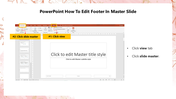
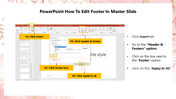
Say goodbye to the days of struggling with inconsistent footers. Our template simplifies the process of editing the footer on your master slides, empowering you to maintain a polished and professional look across all your presentation slides.
With our user-friendly template, you can effortlessly edit and tailor your footer to suit your specific needs. Whether it's adding your organization's logo, adjusting the date format, or incorporating essential contact details, you have the power to make it yours.
Editing the footer in PowerPoint's master slide is not just about aesthetics; it's about streamlining your workflow. Save time and ensure consistency throughout your presentation, whether you're working on a business report, a sales pitch, or an educational seminar.
Our template isn't just about editing footers; it's about unlocking your creativity. You're in control of how your footer looks and what it conveys, giving you the freedom to reinforce your brand or message effectively.
Features of the template:
- 100% customizable slides and easy to download.
- This slide contains 16:9 and 4:3 formats.
- Highly compatible with Google Slides and PowerPoint.
- It is easy to change the slide colors quickly.
- It is a well-crafted template with an instant download facility


You May Also Like These PowerPoint Templates




















Showing36 of69,218 templates