SlideEgg vs Slidesgo
Which Is Better in 2026?
If you're putting together a business pitch, a quarterly review, or a classroom lesson and you need a professional-looking presentation without starting from a blank slide, both SlideEgg and Slidesgo get you there. But they work very differently. SlideEgg gives you a bigger free library, no attribution strings attached, interactive live presentation tools, and a one-time lifetime plan. Slidesgo gives you a tighter, more curated template collection with education-specific AI tools.
This comparison breaks down the real differences: templates, pricing, free plan limits, AI features, and who each tool is actually built for.
Quick Comparison: SlideEgg vs Slidesgo at a Glance
Feature SlideEgg Slidesgo
Total Templates 100,000+ 30,000+
Free Templates 25,000+ slides, 10/day limit 3 downloads/month
Free Attribution Required ❌ Not required ✅ Required on every download
PowerPoint (16:9 + 4:3)
Google Slides
Canva ✅ (native design links) ✅ (separate Canva collection)
AI Deck Generator ✅ (credit-based, PRO) ✅ (included in Premium)
AI Credits on Free Plan 400/month 3 AI presentations/month
Interactive Presentations ✅ (live quizzes, polls, Q&A)
PPT Design Services ✅ (via Redesign Service)
Education Tools ✅ (quiz/poll for classrooms) ✅ Slidesclass (Premium only)
Team Collaboration ✅ (Premium)
Paid Plans (annual) From $6/user/month $35.99/year ($3.00/month)
Lifetime Option ✅ $299 one-time
Template Libraries: Size and Variety
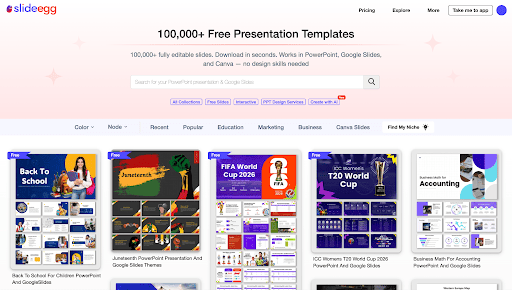
SlideEgg template library
SlideEgg — 100,000+ Templates Across 575+ Categories: SlideEgg's library spans 575+ categories — business infographics, timelines, medical diagrams, education slides, marketing decks, and more. Every template downloads as a free PowerPoint template (16:9 or 4:3 aspect ratio), opens natively as a free Google Slides template, and links directly to a pre-published Canva slide you can copy straight into your Canva account.
The free tier unlocks 25,000+ free templates with no monthly cap; a daily limit of 10 downloads applies to the Free plan. Paid plans remove the daily limit entirely.
Slidesgo template library
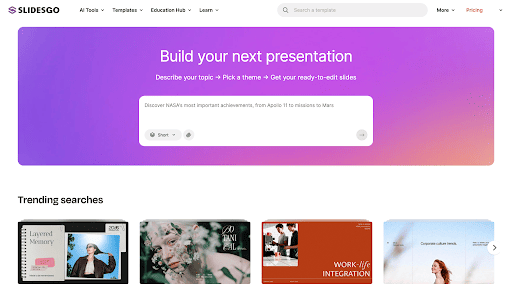
Slidesgo — 30,000+ Designer-Curated Templates: Slidesgo's 30,000+ template library is smaller but visually consistent. Every template is designed in-house, with a strong skew toward clean, modern aesthetics, particularly popular for education decks and business presentations. Templates are available for PowerPoint, Google Slides, and a dedicated Canva collection.
On the free plan, Slidesgo limits you to 3 template downloads per month, and each downloaded file includes an attribution slide that credits Slidesgo. This restriction is removed on the Premium plan.
Verdict: SlideEgg has more than three times the templates and offers more free downloads with no monthly cap. Slidesgo's library is more tightly curated with consistent in-house design.
Pricing Comparison
SlideEgg pricing
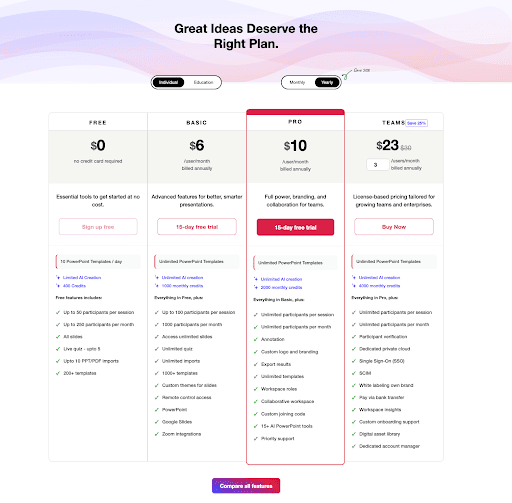
SlideEgg Pricing Plans: SlideEgg offers five pricing tiers, including a free entry point and a one-time Lifetime plan not offered by any major competitor in this space:
Free — 10 template downloads/day, 400 AI credits/month, up to 50 participants/live session. No credit card required. No attribution required on downloaded templates.
Basic — $6/user/month (billed annually). Unlimited templates, 1,000 monthly AI credits, up to 100 live participants.
Pro — $10/user/month (billed annually). Full branding and annotation controls, custom logo, 2,000 monthly AI credits, unlimited participants.
Teams — $23/user/month for 3+ users (billed annually). Everything in Pro plus SSO, SCIM provisioning, white labeling, and dedicated cloud hosting — built for enterprise and larger organizations.
Lifetime Ultimate — $299 one-time payment. Full Pro feature set, unlimited downloads, 200,000 AI credits, no recurring fees ever. Pay once, use indefinitely.
Slidesgo pricing
Slidesgo Pricing Plans: Slidesgo uses a simpler two-tier model:
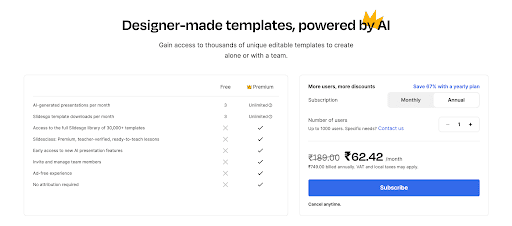
Free — 3 template downloads/month, 3 AI-generated presentations/month, attribution slide required on all downloads.
Premium — $35.99/year ($3.00/month, billed annually). Unlimited template downloads, unlimited AI presentations, Slidesclass (a curated library of teacher-verified K-12 lesson materials), team management, ad-free experience, and the attribution requirement removed.
Pricing verified: Slidesgo USD pricing confirmed as $35.99/year via slidesgo.com/pricing on 2026-06-19.
Verdict: For light individual use, Slidesgo Premium at $35.99/year is the cheaper entry point. SlideEgg's pricing scales better for teams. The Lifetime plan at $299 is the most interesting option for heavy users: compared to SlideEgg's own Pro plan at $120/year, you break even in 2.5 years — everything after that is free. Against Slidesgo Premium at $35.99/year, the math is closer to 8 years. The question is whether you need SlideEgg's interactive features and larger library or just a clean template download service. If it's the former, $299 once beats $120/year indefinitely.
Free Plan Comparison
This is often the deciding factor for first-time users. The two free plans work very differently:
SlideEgg Free:
  • 10 template downloads per day (no monthly cap)
  • 400 AI credits per month for deck generation
  • 25,000+ slides accessible
  • Live session hosting for up to 50 participants
  • No attribution required — downloaded files are yours to use commercially without crediting SlideEgg
Slidesgo Free:
  • 3 template downloads per month (hard monthly limit)
  • 3 AI-generated presentations per month
  • Attribution slide included in every download — you cannot remove it without upgrading to Premium
  • Access to a subset of the library (not the full 30,000+ collection)
For anyone who needs templates more than once or twice a month, SlideEgg's free plan is substantially more generous. Slidesgo's free plan is effectively a trial — it gives you just enough to evaluate the product, not enough to use it regularly.
AI Features Compared
SlideEgg template library
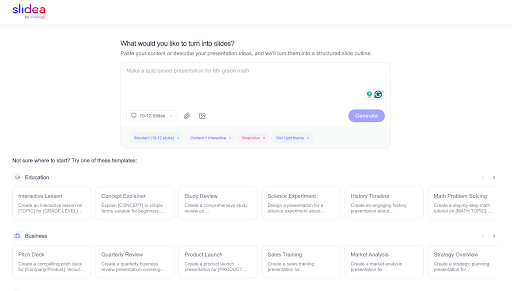
SlideEgg AI: SlideEgg's AI lives inside a dedicated in-browser app called Slidea By SlideEgg. You type a topic or paste content, choose a slide count, and select a generation mode — including "Content + Interactive," which produces slides with quizzes, polls, and interactive elements already embedded. The AI generates a live, editable deck inside the platform — you never have to leave SlideEgg to edit or present it.
  • AI Deck Generation — Full deck from a text prompt, with a live generating view (you watch slides build in real time)
  • Content + Interactive mode — AI generates slides with built-in polls, quizzes, and interactive elements — no manual setup required
  • In-browser live editing — Edit AI-generated slides directly inside the platform; no download step needed to make changes
  • File attachment support — Upload a document and generate slides from your existing content
  • AI Credits — 400 (Free), 1,000 (Basic), 2,000 (Pro), 4,000 (Teams), 200,000 (Lifetime)
The generated deck stays in SlideEgg's ecosystem — meaning you can immediately move from AI generation to live editing to presenting to a live audience with interactive features, all without leaving the app.
SlideEgg template library
Slidesgo AI: Slidesgo's AI Presentation Maker follows a three-step workflow: generate from a text prompt, edit and customize the slides in their in-browser editor, then select a template and download.
  • AI Presentation Maker — Enter a topic, get a complete slide deck with written content and layouts
  • In-browser editing step — Refine and tailor AI-generated slides to match your style before downloading
  • AI PDF to PPT Converter — Upload a document, receive an editable presentation
  • AI Quiz Maker — Auto-generate quizzes from any content input
  • AI Lesson Plan Generator — Education-focused AI tool available via Slidesclass
The final output is a PPTX file you download and open in PowerPoint, Google Slides, or Figma. There is no live presentation layer inside Slidesgo — editing ends at download.
Verdict: The fundamental difference is where the AI-generated deck lives. SlideEgg generates its own live ecosystem — you edit and present inside the same platform, and interactive elements (quizzes, polls) are built in from the start. Slidesgo generates a file you download and edit in another tool. Slidesgo's AI toolset is broader for content types (PDF conversion, lesson plan generator). SlideEgg's AI is more tightly integrated with what happens after you generate – live editing, live presenting, and live audience interaction in one place.
Interactive Presentations: SlideEgg's Unique Advantage
This is the most significant functional difference between the two tools. Slidesgo is a template library — you download files and edit them in PowerPoint or Google Slides. There is no interactive presentation layer.
SlideEgg is also a live interactive presentation platform. Beyond template downloads, SlideEgg lets you:
  • Host live sessions with up to 50 participants (Free), 100 (Basic), or unlimited (Pro+)
  • Run live quizzes, polls, and audience Q&A inside your presentation
  • Annotate slides in real time while presenting
  • Collaborate across team workspaces
If you present to live audiences — a classroom full of students, a sales kickoff, a client Q&A, a company all-hands — SlideEgg gives you capabilities Slidesgo doesn't have at all.
PPT Design Services
SlideEgg redesign services
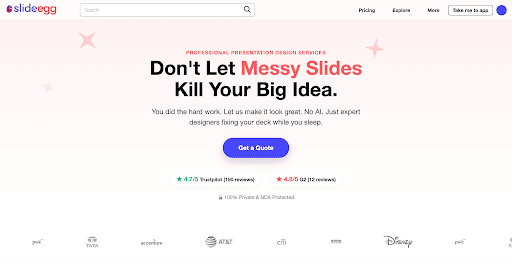
SlideEgg: SlideEgg offers professional PowerPoint redesign services — a design service built into the SlideEgg platform where you submit your slides and a professional designer handles the layout and visual polish. If you have an important pitch or exec deck and want it done right, you can request it directly without leaving SlideEgg.
Slidesgo: Slidesgo has no equivalent service. It's entirely self-service.
Format Support: PowerPoint, Google Slides, and Canva
Both platforms support all three formats, but the implementation differs:
  • SlideEgg: Download dropdown offers PowerPoint (.pptx) in 16:9 or 4:3, direct Google Slides link, and a Canva design share link. Clicking Canva opens a pre-published Canva design at canva.com — you copy it into your Canva account directly, without importing a .pptx file.
  • Slidesgo: Templates download as .pptx for PowerPoint, open in Google Slides, and a separate Canva-compatible collection is available on the site (not all templates are in the Canva collection).
SlideEgg's Canva integration is native (direct design link); Slidesgo's Canva offering is a subset of their library in a separate collection.
Who Should Use SlideEgg?
Choose SlideEgg if:
  • You want more free templates with no monthly download cap and no attribution requirement
  • You need interactive presentations — live quizzes, polls, and audience participation
  • You want a Lifetime plan — $299 once, no renewal ever
  • You need all three formats natively — PowerPoint, Google Slides, and direct Canva design links
  • You need professional redesign help via PPT Design Service
  • You manage team presentations and need collaboration, branding controls, SSO, and participant management
Who Should Use Slidesgo?
Choose Slidesgo if:
  • You want a tightly curated template library with consistent in-house design quality
  • You're a teacher who needs structured lesson materials via Slidesclass (Premium)
  • You need AI to generate slide content from a PDF (Slidesgo's AI PDF-to-PPT tool; SlideEgg has no equivalent)
  • Your usage is light enough that 3 free downloads/month covers you, and you're fine adding an attribution slide
  • You want education-specific AI tools — AI Quiz Maker, AI Lesson Plan Generator
The Bottom Line
SlideEgg is the better pick for most users — more free templates, no attribution requirement, interactive presentation tools, and a lifetime plan that no direct competitor offers. It's trusted by over 5 million professionals and holds a 4.6/5 rating on Trustpilot.
Slidesgo makes sense when design consistency per template matters more than volume, or when you're a K-12 or higher ed teacher who wants ready-to-teach lesson materials and education-specific AI tools through Slidesclass.
Both have free plans. Try SlideEgg's free tier first — 10 downloads a day with no credit card and no attribution hoops is enough to know whether the library fits your workflow. If it doesn't, Slidesgo's free plan gives you three downloads to find out the same thing about their library.

Frequently Asked Questions

Is SlideEgg completely free to use?

Yes. SlideEgg's free plan gives you 10 template downloads per day, 400 AI credits per month, and access to 25,000+ free slides — no credit card required, and no attribution required on downloaded templates.

How many free templates does Slidesgo give you?

Slidesgo's free plan allows 3 template downloads per month. Each downloaded file includes an attribution slide crediting Slidesgo. Upgrading to Premium ($35.99/year) removes both the monthly cap and the attribution requirement.

Does SlideEgg have a lifetime plan?

Yes. SlideEgg's Lifetime Ultimate Plan is a one-time payment of $299 (regularly $599). It includes unlimited template downloads, full Pro features, and 200,000 AI credits with no recurring fees.

Which has more templates — SlideEgg or Slidesgo?

SlideEgg has 100,000+ templates across 575+ categories. Slidesgo has 30,000+ templates. SlideEgg's library is more than three times larger.

Does SlideEgg work with Google Slides and Canva?

Yes. When you download a SlideEgg template, the dropdown gives you a PowerPoint option (16:9 or 4:3), a direct Google Slides link, and a Canva design link that opens a pre-published copy in Canva — no file import required. All formats are available on every plan including free.

Does Slidesgo work with PowerPoint?

Yes. Slidesgo templates are available in .pptx format for PowerPoint and also open in Google Slides. A separate Canva-compatible collection is available on their site.

Which is better for teachers?

Depends on how you use it. Slidesgo's Slidesclass (Premium only) gives K-12 and higher ed teachers ready-to-teach, teacher-verified lesson materials organized by subject and grade level, plus an AI Lesson Plan Generator — it's built specifically for educators. SlideEgg has education-category templates plus live classroom tools: run quizzes and polls from inside your deck while students respond in real time. If you need structured, curriculum-aligned lesson content, go with Slidesgo Premium. If you want to make your presentations interactive for students, SlideEgg Pro is the pick.

Can I use SlideEgg for live presentations?

Yes. SlideEgg is both a template library and a live presentation platform. You can host interactive sessions with quizzes, polls, and live Q&A — up to 50 participants on the free plan, unlimited on Pro and above.

Does SlideEgg require attribution on free templates?

No. SlideEgg is one of the few presentation template tools that lets you download and use free templates — including for commercial presentations — without crediting SlideEgg anywhere. Slidesgo, by contrast, adds an attribution slide to every free download that you can only remove by upgrading to Premium.