Free - Digital Marketing Org Chart For PPT, Google Slides, Canva
Free

 Canva
Canva
Digital Marketing Org Chart Template: Two Team Models
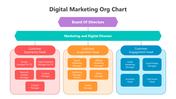
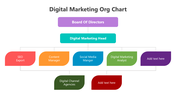
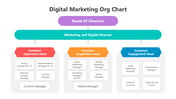
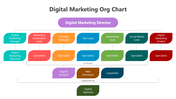
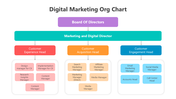
This pack doesn't give you one fixed org chart. It gives you two different ways marketing departments are commonly structured. The first model runs Board of Directors down through a Marketing Director to three department heads: Customer Experience, Customer Acquisition, and Customer Engagement, each with four to five specific roles underneath (design, research, search marketing, affiliate marketing, email marketing, and more). This version appears three times in the pack in different color treatments. The second model, on a separate slide, structures the team by function instead of customer journey stage: a Digital Marketing Director over seven leads, automation, content, SEO, advertising, social, and analytics, each with a specialist tier below, plus separate bands showing which roles are in-house versus supported by outside agencies.
Which Model Fits Your Team
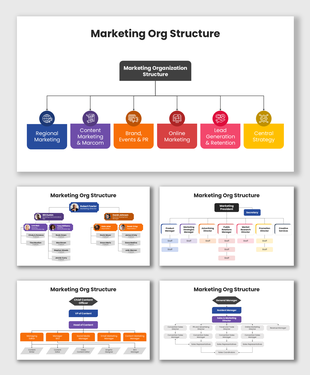
If your marketing org thinks in terms of the customer journey, acquisition versus retention versus experience, the three-department model maps that directly. If your team is organized by channel or function instead, the seven-lead model with its in-house/agency split will match your structure more closely. For a lighter single-slide version of the function-based model, the marketing org structure template covers similar ground without the full multi-slide pack.
Every role box, title, and color is editable across PowerPoint, Google Slides, and Canva. Free to download. Browse the full organization charts collection for other department structures.
Features of this template:
- Free download with no watermark
- Compatible with PowerPoint, Google Slides, and Canva
- 100% editable shapes, colors, and text
- Widescreen 16:9 and standard 4:3 layouts
- Well-crafted template with an instant download facility
- Two organizing models: customer journey and function-based
- In-house vs. agency-supported role tiers
- Three color styles of the same department model
FAQs
How many genuinely different chart designs are in this 13-slide pack?
Two — a three-department customer journey model (shown in three color variants) and a seven-function model with in-house/agency tiers. The rest are bonus icon libraries, an editing guide, terms of use, and a thank-you slide.
Which slide should I use for a board presentation?
The three-department model (slides using the Board of Directors framing) reads cleanest at that level.
Is this free?
Yes, free to download and editable in PowerPoint, Google Slides, and Canva.









You May Also Like These PowerPoint Templates








Showing36 of69,218 templates