Incredible Presentation On Technology PPT Slide Design
Nodes
Colors










Explain a Connected System with This Technology PPT Slide
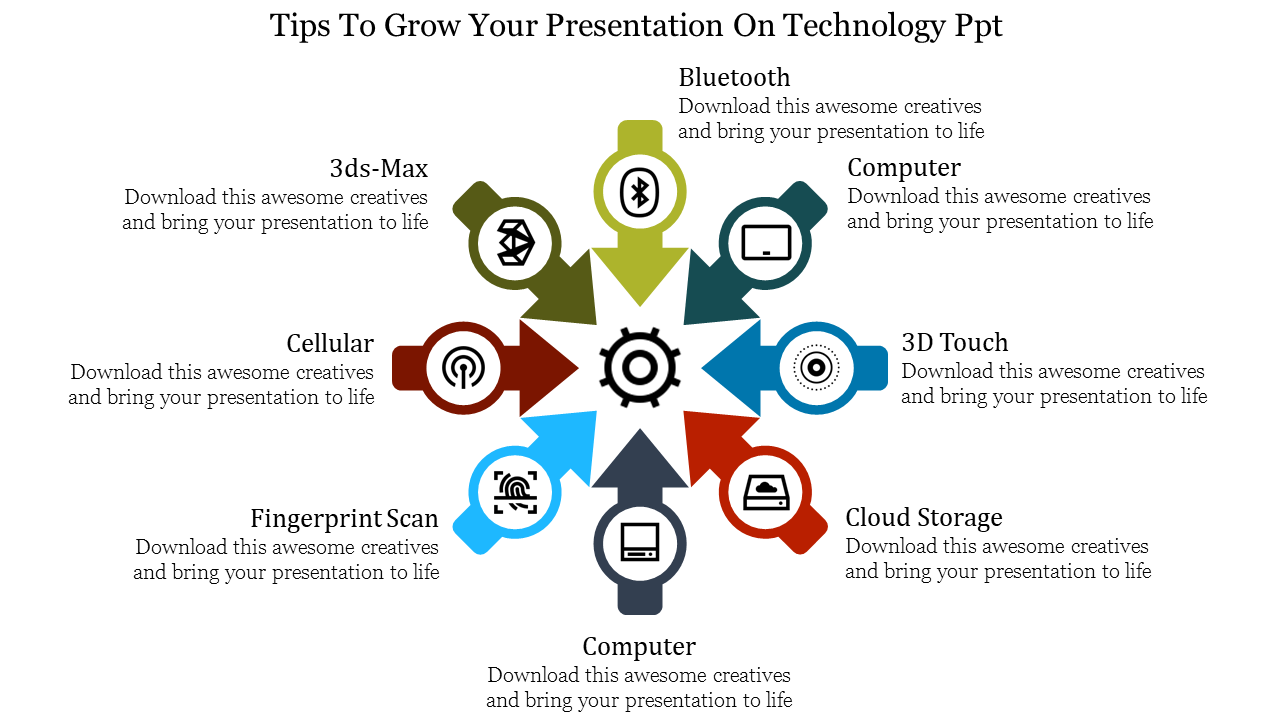
This single-slide radial diagram brings eight technology elements together around a central gear. It is most useful when the audience needs to understand how several capabilities, tools, or system components support one shared product or objective.
The original examples include Bluetooth, cellular connectivity, fingerprint scanning, cloud storage, 3D Touch, computers, and 3ds Max. These items come from different technology levels, so retaining every label may produce an unclear story. Replace them with one consistent group that matches your subject.
Build One Coherent Set of Eight Points
For a mobile-device ecosystem, the sections could represent the following:
Wireless connectivity
Mobile network
User authentication
Cloud storage
Touch interface
Processing
Application support
Data synchronization
For an organizational technology assessment, consider infrastructure, networking, security, data, integration, user experience, automation, and governance.
Use the central gear to name the product, system, or goal connecting those points. The audience should be able to finish this sentence: “All eight elements contribute to ___.”
Read the Arrows Correctly
The arrows point toward the centre, which makes the layout suitable for showing inputs, contributing technologies, or supporting capabilities. It does not naturally represent a timeline or eight sequential steps.
If your story requires a beginning and an end, use a numbered process instead. When the relationships are the important part, keep the radial arrangement and explain how each component affects the centre.
Replace the repeated “Computer” labels and remove the generic promotional sentences beneath the headings. Each section has limited space, so use a short heading followed by one clear function, requirement, or outcome.
The icons, arrows, colours, headings, and supporting text are customizable. The slide is available in standard and widescreen formats and can be adapted in PowerPoint, Google Slides, or Canva.
For additional hub, comparison, and infographic structures, browse the parent Technology PowerPoint Templates. If your information must show movement or ordered progression instead of a connected system, the Arrow PowerPoint Templates provide more suitable layouts.
More Collections for Incredible Presentation On Technology PPT Slide
Recommended based on this template.









Similar Templates to Incredible Presentation On Technology PPT Slide







Showing20 of69,218 templates