Informative Li Fi Technology PowerPoint And Google Slides


Show How Li-Fi Moves Data Through Light
Li-Fi becomes easier to understand when the audience can follow the signal from its source to the receiving device. This 11-slide presentation uses process diagrams, comparisons and application layouts to explain how a light-based communication system can transmit data.
What This 11-Slide Presentation Contains
The five main content slides cover the following:
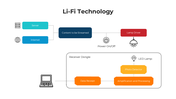
System architecture: Trace content from a server or the internet through a lamp driver and LED light to a photodetector, processing unit, and receiving device.
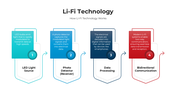
How Li-Fi works: Explain the sequence from rapid LED-light modulation to signal detection, data processing, and bidirectional communication.
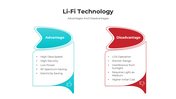
Advantages and limitations: Compare potential benefits such as data speed, low power consumption, and reduced radio-frequency use with line-of-sight requirements, shorter range, sunlight interference, and implementation cost.
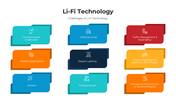
Possible applications: Introduce underwater communication, medical environments, aviation, industrial areas, lighting systems, transportation, traffic management, indoor navigation, and sensitive locations.
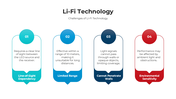
Practical challenges: Discuss limited range, wall penetration, environmental sensitivity and the need for a clear signal path.
Slides 6 and 7 provide editable icons. Slides 8–11 include shape-editing guidance, usage information, and a closing slide.
Correct One Label Before Using the PPT
The fourth content slide is titled “Challenges of Li-Fi Technology", but its boxes describe applications and possible use cases. Rename this heading to “Applications of Li-Fi Technology,” so it accurately represents the information underneath.
Add Context to Technical Claims
Avoid presenting Li-Fi as a universal replacement for Wi-Fi. Its suitability depends on the lighting infrastructure, receiver design, room layout, mobility requirements and surrounding light conditions.
Before presenting, add:
A source for any speed, cost, or security claim
The type of Li-Fi system being discussed
Whether the example is commercial, experimental, or proposed
The conditions under which the stated performance was measured
A comparison covering range, obstruction, mobility, and installation needs
For a balanced discussion of light-based and radio-based connectivity, compare this deck with the Wi-Fi Technology presentation.
The diagrams, labels, colours, and icons can be adapted in PowerPoint, Google Slides, or Canva. Explore the parent Technology PowerPoint templates collection for supporting slides on networking, smart systems, and other communication technologies.
More Collections for Informative Li Fi Technology PowerPoint
Recommended based on this template.










Similar Templates to Informative Li Fi Technology PowerPoint









Showing36 of69,218 templates