Operational Technology PowerPoint And Google Slides

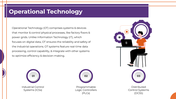

Explain Operational Technology Without Blurring It With IT
Operational technology controls or monitors physical equipment and industrial processes. That distinction matters: an IT system may manage information, while an OT failure can interrupt production, damage equipment, or create a safety risk.
This Operational Technology PowerPoint provides a visual starting point for plant briefings, OT awareness sessions, engineering classes, modernization proposals and IT–OT discussions.
Follow the OT System From the Field to the Business
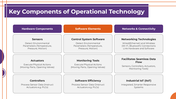
The deck introduces operational technology through Industrial Control Systems, Programmable Logic Controllers and Distributed Control Systems. Its component table then separates an OT environment into three areas:
Hardware: sensors, actuators and controllers
Software: control-system applications and monitoring tools
Connectivity: wired or wireless networks, integrated data flows and Industrial IoT
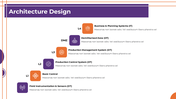
An architecture diagram traces the environment upward from field instrumentation and sensors to basic control, production-control systems, production management, a demilitarized zone and business-planning systems. Adapt this slide to reflect your actual architecture instead of treating the sample structure as universal.
Discuss Operations, Risk and Modernization
The presentation supplies dedicated layouts for:
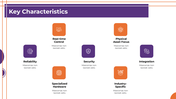
Reliability, real-time control and physical-asset focus
Specialized hardware, security and system integration
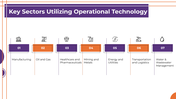
Manufacturing, oil and gas, healthcare, mining and metals
Energy, transportation, logistics and water management
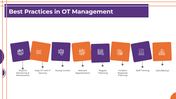
Routine monitoring and maintenance
IT–OT security alignment and network segmentation
Patching, incident response, workforce training and backups
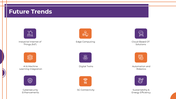
Industrial IoT, edge computing and cloud-connected OT
AI, digital twins, robotics and 5G connectivity
Cybersecurity improvements and energy efficiency
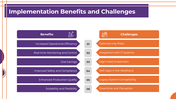
A final comparison places six potential benefits beside six implementation challenges. Benefits include efficiency, monitoring, cost savings, safety, production quality and scalability. The challenges cover cyber risk, IT integration, initial investment, skills shortages, legacy compatibility and operational disruption.
Build the Presentation Around a Real Facility
For a more credible OT presentation:
Replace the generic architecture with the facility’s actual systems and network boundaries.
Identify the physical process controlled by each component.
Add asset owners, maintenance responsibilities, and incident contacts.
Support proposed benefits with measured baselines.
Separate current controls from planned improvements.
Remove future trends that are not relevant to the operation.
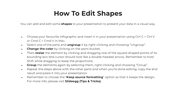
The file contains 17 slides, but only the opening nine form the OT narrative. Slides 10–13 are icon libraries, while the remaining pages provide shape-editing guidance, usage terms, and a closing slide. Some smaller descriptions are still placeholder copy, so review every diagram before presenting it.
Grouped diagram elements can be adjusted using the included shape instructions or through SlideEgg’s Edit option. The presentation is also prepared for customization in PowerPoint, Google Slides, and Canva.
Use the wider Technology Presentation Templates collection for supporting architecture or transformation visuals. When OT security becomes the main subject, the Cyber Security PowerPoint Templates collection provides more focused risk and protection layouts.
More Collections for Operational Technology PowerPoint
Recommended based on this template.










Similar Templates to Operational Technology PowerPoint








Showing36 of69,218 templates