Smart Eye Technology PowerPoint And Google Slides Templates

Make the Meaning of Smart Eye Technology Clear
“Smart eye technology” can refer to eye tracking, gaze analysis, biometric identification, driver monitoring or human-computer interaction. Define the exact meaning at the beginning of your presentation so the audience understands which system and use case you are discussing.
This 11-slide deck provides five content slides for explaining where eye-based technology is used, how gaze information is processed and which capabilities may be associated with it.
What You Can Explain With These Slides
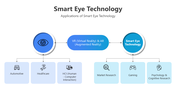
Applications: Connect eye technology with automotive systems, healthcare, human-computer interaction, market research, gaming, psychology and cognitive research. The slide also positions VR and AR as related environments.
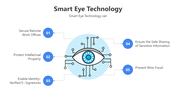
Security-related use cases: Discuss remote-work security, intellectual-property protection, identity-verified electronic signatures, sensitive-information sharing and wire-fraud prevention.
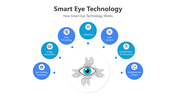
How eye tracking works: Present the process from eye-tracking hardware and image acquisition to data processing, calibration, gaze analysis, interpretation and output.
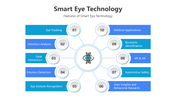
Features and capabilities: Organize eye tracking, attention analysis, gaze interaction, emotion detection, gesture recognition, behavioural insights, automotive safety, VR and AR, biometric identification and medical applications around one visual framework.
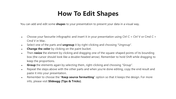
Slides 6 and 7 supply editable technology icons. The remaining slides provide shape-editing guidance, usage information and a closing screen.
Separate Established Functions From Possible Use Cases
Some capabilities shown in the presentation require more than eye tracking alone. Biometric authentication, electronic signatures and fraud prevention may depend on identity-verification systems, security controls and other supporting technologies.
Before presenting:
Name the particular device, platform or research method being discussed.
Separate measured capabilities from proposed applications.
Support medical, safety and security claims with reliable sources.
Explain how gaze or biometric data is collected, stored and protected.
Address consent and privacy when the technology monitors individuals.
These checks are especially important for healthcare, employee monitoring and identity-related presentations.
The editable process diagrams and radial layouts can be adapted in PowerPoint, Google Slides or Canva. If immersive interaction is central to your topic, the AR and VR Technology presentation offers a more focused supporting resource.
Explore the parent Technology PowerPoint templates collection for additional material on AI, cybersecurity, networking and emerging technologies.
More Collections for Smart Eye Technology PowerPoint
Recommended based on this template.










Similar Templates to Smart Eye Technology PowerPoint








Showing36 of69,218 templates