Know The Steps Of How To Spell Check In PowerPoint


Step By Step Guide To Spell Check In PowerPoint
Spelling is the fashion in which the letters are arranged in a word. They play a significant role in Phonetics. In English, different words differ by a single letter, similarly sounding words called homophones, etc. So it is mandatory to check the spelling of the words before we speak or type. A wrongly spelled word could erroneously convey the meaning. In PowerPoint, Spell Check makes this process very simple. Guess what? We are here to help you with the steps to the Spell Check process to simplify it.
How To Spell Check In PowerPoint?
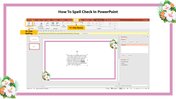
Step 1: Click 'Review' on the Menu bar.
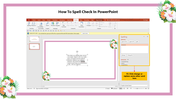
Step 2: Click the 'Spelling' option.
Step 3: Click change or replace some other word at the pop-up box that appears.
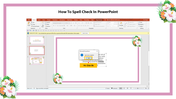
Step 4: A Dialog box shows that the Spell check is complete; Click 'OK.'
We provide thousands of pre-built templates that are attractive and easily editable. With these steps, you can make your presentation error-free. We also provide Free templates for your deliberate use. For pre-designed PowerPoint templates, do visit our page, SlideEgg.










You May Also Like These PowerPoint Templates



























Showing36 of69,218 templates