Tips: How To Create A Hyperlink In PowerPoint Presentation

Pack of 5 slides
P.ID : 64468
Advertisement
57 views
2 Downloads
Designer
Kavitha
Get Custom Slides by Experts
Enhance Your Presentations with Add-ins
Google Slides Add-in
Access templates directly in Google Slides
Microsoft PowerPoint Add-in
Access templates directly in PowerPoint
GPT Add-on
AI-powered presentation assistance

Tips For How To Create Hyperlink In PPT

Hyperlinks are the best way to connect pages and other resources all over the web to each other. Without hyperlinks, you can not connect with the audience. Hyperlinks highlight essential statements and suggest additional content. You can even modify the font size of Hyperlinks to fit your presentation. You can Also download pre-designed slides from SlideEgg, pick one of the designs, and customize it to your liking.

Step By Step Method For Create Hyperlink In PowerPoint


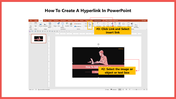
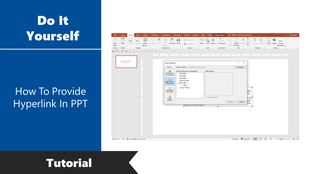
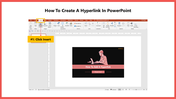
Step 1: Click Insert > Link > Select insert link.
Step 2: Select the Image or Text box
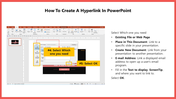
Step 3: Select Which One You Need to Add.
Step 4: Select Ok.

As you can see, Creating Hyperlink In PowerPoint is straightforward and will take you very little time.
You May Also Like These PowerPoint Templates
Free
Add to Wishlist
Download
Edit
Discover How To Insert Calendar In PowerPoint Slides
Add to Wishlist
Download
Edit
Do It Yourself guide on how to create a Gantt chart in PowerPoint, with a hand marking tasks on a timeline.
Add to Wishlist
Download
Edit
Guide on rotating a PowerPoint slide, showing the slide size and orientation settings window.
Free
Add to Wishlist
Download
Edit
Tutorial on removing background in PowerPoint, featuring a man working on a computer illustration.
Add to Wishlist
Download
Edit
DIY tutorial for changing slide layout in PowerPoint, with options displayed in a dropdown menu.
Add to Wishlist
Download
Edit
Cover slide deck for SlideEgg tutorial on copying and pasting slides in PowerPoint, bordered in green and black.
Free
Add to Wishlist
Download
Edit
Slide deck with highlighted steps to change indent, framed by a red border and red flowers in the corners.