PPT Tips and Tricks: Create Amazing Presentations Like a Pro
Practice makes perfect, right? Our PowerPoint Presentation Tips and Tricks ensure you're ready for great presentations. No more last-minute panic – you'll be as prepared as a professional. Boost your confidence, unleash your creativity, and upgrade your presentation skills in a snap with our PowerPoint hacks. Our learning PPTs include easy-to-follow tips designed for everyone. Our guide will walk you through, step by step, turning confusion into clarity. Ready to impress your audience? Join us on the journey to becoming a presentation expert! Your slides are going to be different from now on. Upgrade your skills now with our tips and tricks!

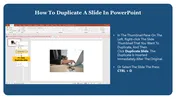
We're here to help you!
What is the purpose of the PowerPoint Presentation Tips and Tricks page?
The purpose of the PowerPoint Presentation Tips and Tricks page is to empower users with the knowledge and skills needed to create compelling and effective presentations using Microsoft PowerPoint. It serves as a comprehensive resource hub, offering a wealth of tutorials, tips, and tricks to enhance the presentation creation process.
What types of tips and tricks are covered on this page?
How can I access the learning PPTs on the page?
Accessing the learning PowerPoint presentations is simple. You can navigate to the page and directly view or download the PPT files. These presentations serve as educational tools, guiding users through practical steps to improve their PowerPoint skills.
How can I find the right PowerPoint tips and tricks for my needs?
To find specific PowerPoint tips and tricks tailored to your needs, you can use the search bar on the page.
Are all of the tutorials on this page step-by-step?
Yes, the tutorials on this page are designed to be step-by-step guides. They provide clear and detailed instructions, ensuring that users can follow along easily and implement the tips and tricks in a practical manner.
How do I use these DIY templates to create my own PowerPoint presentations?
Using the DIY templates is simple. These templates are pre-designed to guide you through the process of creating professional and visually appealing presentations, saving you time and effort. Open the template provided on the page, and follow the included instructions to create your own PowerPoint presentations.
How can the tips and tricks on this page help improve my presentations?
The tips and tricks on this page are curated to enhance various aspects of your presentations. Whether you are looking to improve design aesthetics, incorporate multimedia elements effectively, master advanced features, or troubleshoot issues, the page provides practical insights and guidance to elevate your overall presentation skills and delivery.