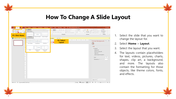

How-to content needs step-by-step visual clarity. If the process isn't easy to follow on a slide, your audience won't follow it in real life.
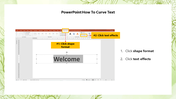
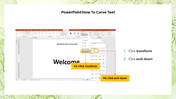
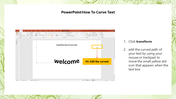
This PowerPoint How To Curve Text gives you an editable tips-focused slide set that's ready to use the moment you download it. The slide features slide demonstrating how to create curved text in PowerPoint, with an example of curved text. Drop it into your deck, replace the placeholder text, and you're done.
Actionable, clearly structured tip slides — open, edit, and present — text, colors, icons, and layout are all yours to adjust. Design variations include: How To Curve Text In PPT, PPT Tips, PPT Tricks, Curve Text Tips. Match your brand, adapt the layout, change the colors — it takes minutes, not hours.
Built for professionals, students, educators, and anyone who needs a polished, ready-to-use presentation template. No design background needed — just open, edit, and present.
Available for PowerPoint. Download instantly — no design skills required. Everything is fully customizable to match your brand or topic.
Explore more How To Learning PPTs PowerPoint slides to find the right fit for your next presentation.