These presentation nights have grown in popularity as a creative method to bring people together. These nights have evolved from simple slide presentations among friends to something much more, often linked with Christmas and New Year’s night celebrations. These presentations are about smiles, not business or reports.
Creating Christmas and New Year slides for a PowerPoint presentation is not easy. It is necessary to place more importance on these three elements: readability, storytelling, and magical flow. Based on these characteristics, anyone may create magical slides that are filled with love and fun.
This tutorial will walk you through how to make interesting Christmas and New Year’s night presentations using PowerPoint step by step.
What is a PowerPoint Night?
A PowerPoint Night is an enjoyable, after-work, or social gathering in which participants create short slide shows on funny, personal, or creative topics. Unlike traditional business presentations, PowerPoint nights focus on stories, jokes, views, and shared experiences.
Around Christmas and New Year, these slides typically cover:
- Memories from the end of the year
- Holiday traditions
- funny moments
- Personal goals
- Lighthearted predictions
The goal isn’t perfection, it’s connection.
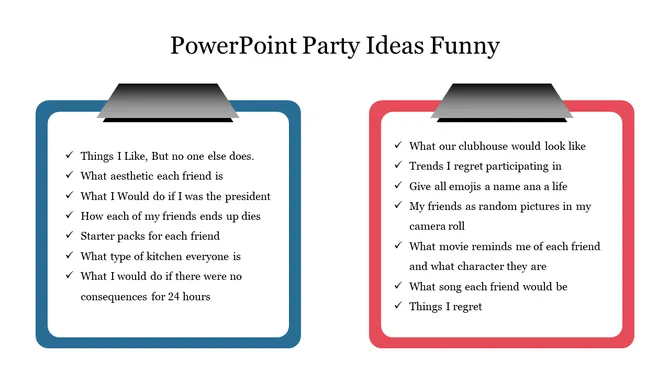
Credit: https://www.slideegg.com/powerpoint-party-ideas-funny
Why Christmas PowerPoint Nights Work
Christmas naturally creates a sense of social kindness. Sharing stories, customs, or simply funny events with slides is natural and entertaining. It transforms ordinary memories into shared experiences, bringing people closer.
Christmas presentation topic ideas
Here are some Christmas presentation topics that are both simple to produce and interesting for everyone:
- Things that only happen during Christmas
- Christmas traditions that continue every year
- Funny or surprising gift moments
- Small moments that made the previous year special.
Tips for creating Christmas-themed slides:
- Choose warm colours such as red, green, grey, or soft gold.
- Keep layouts clean and uncluttered.
- Choose graphics that enhance the holiday spirit without distracting.
A Christmas PowerPoint template helps you focus on your content instead of visual formatting. This results in faster preparation and a clean, joyful presentation that perfectly fits the holiday spirit.

Credit: https://www.slideegg.com/free-christmas-powerpoint-presentation-templates
What Makes a New Year PowerPoint Night Different?
New Year’s presentations frequently create a balance between analysis, honest self-awareness, and light optimism about what is next. The tone can be thoughtful, playful, or optimistic.
New Year Topic Ideas
Good concepts include “What This Year Teaching Me”.
- Goals I Tried (but Didn’t Finish)
- Unexpected Wins of the Year
- Predictions for the year ahead (fun)
Slide Style for New Year
Use simple layouts, moderate or colourful tones, and minimum text to let storytelling flow. Templates help in maintaining focus without distraction.
Why New Year Slides Feel Powerful
They allow honesty, making people relate to unfinished goals, lessons learned, and small wins over perfect success stories.
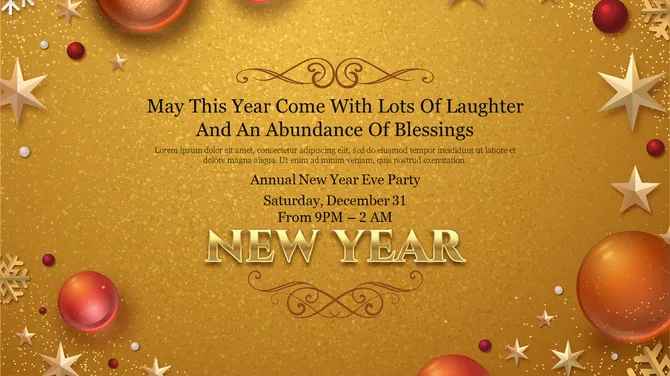
Credit: https://www.slideegg.com/new-years-eve
How to Create Christmas & New Year Slides
Step 1: Choose a festive and relatable topic.
Begin with a topic that feels appropriate for the season. Christmas and New Year’s presentations perform best when they represent a shared experience and feeling.
Some easy topic ideas are:
This year’s most unexpected moments are unique to the Christmas season.
New Year Goals I Want to Follow.If this year is a movie.
Holiday Habits I Don’t Give Up
Pick something you are comfortable talking about. If it makes you smile, it is bound to engage others as well.
Step 2: Keep Slide Count Short and Focused
PowerPoint night’s ideas are not for long explanations. The ideal level typically consists of 5 to 8 slides. This maintains a lot of power levels and avoids overthinking.
A simple structure is best:
- Title Slide
- Introduction or Context
- Main idea or story
- Examples or Highlights
- Fun visual or takeaway
- Closing thought
This format works equally well whether you’re using Professional PowerPoint Templates or simple blank slides.
Step 3: Write slides as you speak.
Less formal is better. PowerPoint night slides should be conversational, not report-like.
Instead of
This presentation explores my achievements during the year.
Try:
This year surprised me more than I expected.
Use short sentences. Ask questions. Add pauses where you would normally speak. This is what makes your slides feel alive and, most importantly, easy to follow.
Step 4: Use Visuals That Support the Story
Visuals matter, but they needn’t be complicated. Christmas and New Year slides require clean and warm visuals rather than cluttered designs.
Good visual choices include:
- Simple Icons
- Light festive colours
- Minimal illustrations
- Photos that match the mood.
Whether you are using Business PowerPoint Templates or designing a custom layout, ensure that everything is clear. One idea per slide is enough.
Step 5: Include funny and real moments.
Being honest is what makes PowerPoint nights special. A prank, a problem with which others may identify, or even a self-aware observation can frequently connect more effectively than beautiful pictures do.
Examples:
A slide entitled Plans That Didn’t Go as Expected.
A list of resolutions with honest comments
A Comparison between “January Me” and “December Me”
These are moments that bring laughter and make your presentation feel real.
Step 6: End with a warm or thoughtful remark.
Presentations related to Christmas and New Year are complete when they end with reflection or hope.
- You could close with:
- One thing you learned
- One thing you’re grateful for
- One simple intention for the coming year
This doesn’t have to be emotional or serious. Even a calm, well-thought-out sentence is enough to leave a good impression.
Step 7: Make It Easy for Others to Join In
If you’re leading a PowerPoint night, remind everyone to keep it simple. Share basic tips such as
- 5–8 slides only
- No judging
- No design pressure
- Focus on storytelling.
Why PowerPoint Nights Work So Well during Holidays
Christmas and New Year templates are naturally built around reflection, joy, and togetherness, which makes them a perfect fit for PowerPoint nights.
They:
- Encourage creativity without stress.
- Give everyone a voice
- Create shared memories
- Turn presentations into conversations.
Unlike formal slide decks, these presentations remind us that slides are simply tools for telling stories.
Final Thoughts:
Making night slides for Christmas and New Year PowerPoint doesn’t call for technical skill or perfection in design. What really matters is clarity, honesty, and connection. By choosing a relatable topic, keeping slides simple, and speaking naturally, you can turn a basic presentation into a meaningful shared experience. Whether you’re using Professional PowerPoint Templates, Business PowerPoint Templates, or even your own layouts, remember this: PowerPoint nights are about people first. Slides only support the story-you are the story.
FAQ
1. What are Christmas and New Year PowerPoint templates?
They are pre-designed layouts with fun backgrounds that make the presentation of notions easy when the event is a holiday activity.
2. Who can use Christmas and New Year PowerPoint templates?
They can be used by students, teachers, teams, and individuals for celebrations, reflections, and presentations.
3. In what cases should I use these templates?
It is most useful for Christmas party thoughts, New Year thoughts, party sessions, and year-end sessions.
4. Can templates be personalised?
Absolutely, you can modify text, colours, images, and layouts to suit your content and audience.
5. What is the advantage of a template over making presentation slides originally?
Templates increase efficiency, maintain consistent formatting, and enable the writer to concentrate on storytelling rather than design.



