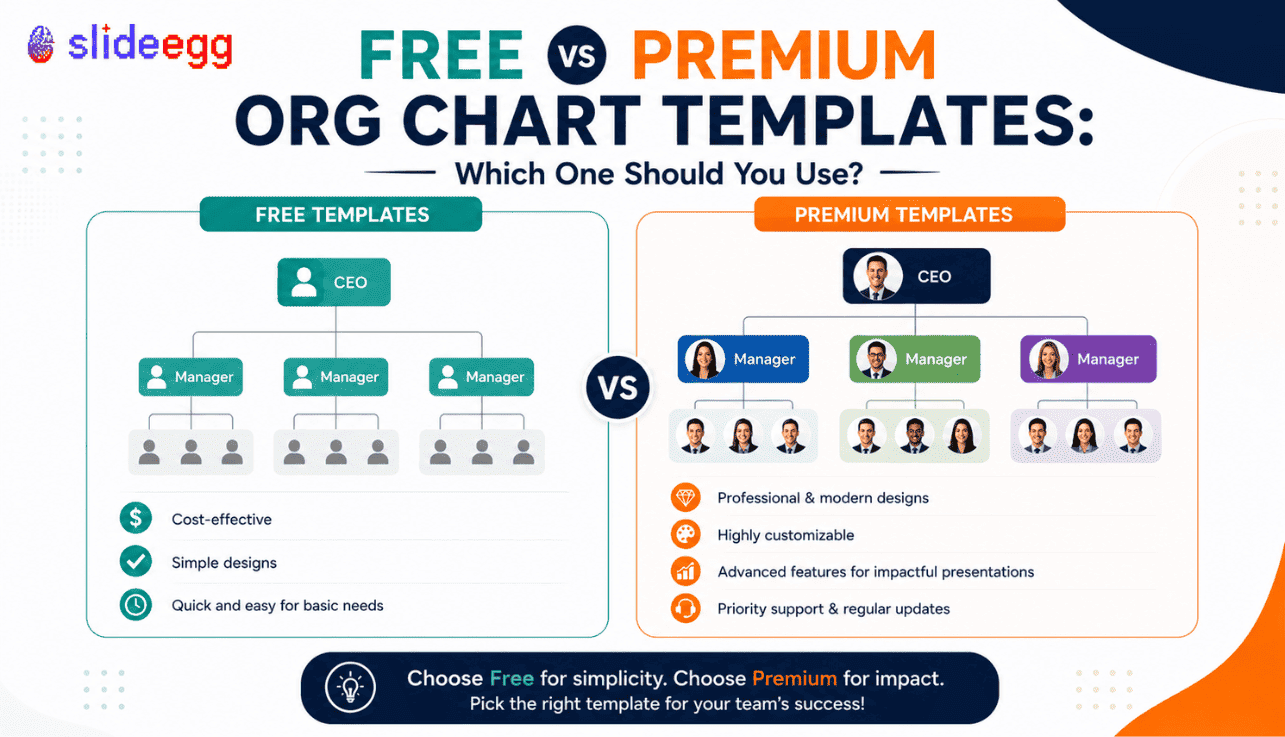
Free org chart templates are useful when you need a simple structure quickly. Premium templates are better when the chart needs to look polished, handle more roles, or support a business-critical presentation. The right choice depends on your audience, purpose, and how much customization you need.
Why This Choice Matters
An org chart may look like a simple slide, but it carries important information. It shows who leads, who reports to whom, how departments connect, and how responsibilities are arranged. If the chart is unclear, the audience may misunderstand the structure.
That is why choosing between a free and premium org chart template should not be based only on price. A free template may be enough for a small internal meeting. But if you are preparing an investor deck, company profile, HR onboarding presentation, or client-facing business slide, the template needs to be clean, editable, and presentation-ready.
The goal is not to choose the most expensive option. The goal is to choose the template that fits the job. A simple team chart does not need a complex premium layout. A large company structure should not be forced into a basic free design.
If you plan to create the chart from scratch in PowerPoint, you can also read this guide on how to create an organizational chart in PowerPoint. But if speed and design consistency matter, a ready-made template is usually the better route.
Free Org Chart Templates: What They Are Best For
Free org chart templates are best for simple needs. They usually include basic layouts that help you show a small team, department, or reporting structure without designing from zero.
For example, if you need to show a manager and a few team members in a quick meeting, a free template can work well. It gives you a ready layout, saves formatting time, and helps you avoid blank-slide design work.
When Free Org Chart Templates Work Well
Best for simple, quick, and low-risk presentation needs
Free templates are useful when the chart is not the main focus of the presentation. They work well when you need a basic structure, quick visual support, or a simple slide for internal communication.
Best For: Small teams, simple reporting structures, classroom use, quick internal meetings, basic HR slides, and personal projects.
Watch Out: Free templates may have limited layout options, fewer design variations, and less flexibility for larger teams or branded business decks.
Advantages of Free Org Chart Templates
They Save Time
A free template helps you avoid building every box, connector, and label manually. You can replace the sample text with names, roles, and departments quickly.
They Are Good for Simple Structures
If your team has one leader, a few managers, and a small group of employees, a free template may be enough. You do not need a complex premium layout for a simple structure.
They Help Beginners
If you are not comfortable designing slides, a free org chart template gives you a starting point. You can learn how the structure works before moving to more advanced layouts.
They Are Useful for Quick Drafts
Free templates are also helpful when you need to create a draft version of a chart before finalizing the actual team structure. You can test the layout before spending more time on design.
Limitations of Free Org Chart Templates
Free templates are useful, but they are not always enough. The limitation usually appears when the chart needs to support a more serious business presentation.
Limited Layout Variety
Free templates often provide fewer layout choices. You may get a basic hierarchy chart, but not a matrix chart, circular chart, photo-based chart, or department-level structure.
Less Room for Complex Teams
If your organization has multiple departments, managers, dotted-line reporting, or project-based responsibilities, a basic free layout can become crowded quickly.
May Need More Manual Editing
Some free templates need extra formatting before they look polished. You may need to adjust spacing, resize boxes, change colors, or clean up alignment.
Not Always Ideal for Client-Facing Slides
If the presentation is going to investors, clients, partners, or senior leadership, the chart needs to look refined. A weak chart can make the structure look less professional.
Premium Org Chart Templates: What They Are Best For
Premium org chart templates are built for users who need stronger design, better flexibility, and more presentation-ready layouts. They are useful when the chart needs to look polished and handle more information clearly.
A premium template can include multiple chart styles, better spacing, editable elements, photo placeholders, department-based designs, matrix layouts, and more professional visual hierarchy.
When Premium Org Chart Templates Make Sense
Best for polished, detailed, and business-critical presentation use
Premium templates work best when the org chart is part of a professional business deck. They help you present complex team structures clearly without spending hours on manual formatting.
Best For: Investor decks, company profile presentations, HR onboarding decks, client presentations, leadership meetings, and complex department charts.
Watch Out: Do not choose a premium template only because it looks attractive. Choose it because the layout fits your structure and improves clarity.
Advantages of Premium Org Chart Templates
They Look More Professional
Premium templates usually have better spacing, cleaner typography, stronger visual balance, and more polished design. This matters when your audience is judging the quality of your presentation.
They Handle Larger Structures Better
If you need to show multiple departments, managers, roles, or reporting levels, premium templates often provide layouts that can handle more information without looking crowded.
They Offer More Layout Options
Premium collections may include hierarchy charts, matrix charts, circular org charts, photo org charts, department charts, and team structure slides. This gives you more flexibility.
They Reduce Manual Formatting
A good premium template already has balanced spacing, aligned boxes, connector lines, and design consistency. You spend more time editing content and less time fixing layout problems.
They Work Better for Branding
Premium templates are usually easier to customize with brand colors, fonts, icons, and images. This helps the org chart match the rest of your presentation.
Free vs Premium Org Chart Templates: Side-by-Side Comparison
| Factor | Free Template | Premium Template |
| Best Use | Simple internal charts and quick drafts | Professional decks, complex structures, and client-facing slides |
| Design Quality | Basic to good | More polished and presentation-ready |
| Layout Options | Usually limited | More styles and structure types |
| Customization | Good for simple edits | Better for branding and advanced edits |
| Complex Teams | May become crowded | Handles larger structures better |
| Time Saving | Saves basic setup time | Saves both setup and design cleanup time |
| Best Audience | Internal teams, students, small groups | Clients, investors, leadership, HR teams |
When You Should Use a Free Org Chart Template
Use a free org chart template when the structure is simple and the presentation does not need a heavy design finish.
For example, a free template is enough if you are creating a small team chart for an internal meeting. It is also suitable for classroom presentations, student projects, basic HR notes, and early planning drafts.
A free template is also useful when you are still deciding the structure. You can create a rough version, review the reporting lines, and later move to a more polished version if needed.
Use a Free Template When: The audience is internal, the structure is small, the chart is simple, and the slide does not need advanced design or branding.
When You Should Use a Premium Org Chart Template
Use a premium org chart template when the presentation needs to look professional and the chart must communicate structure clearly without visual confusion.
This is important for investor decks, company profile presentations, client proposals, HR onboarding decks, leadership meetings, and strategic planning presentations. In these cases, the org chart is not just a support visual. It helps the audience understand how the business or team is organized.
Premium templates are also better when you need more than one layout. For example, you may need one slide for leadership, one for departments, one for project responsibilities, and one for team photos.
Use a Premium Template When: The audience is external or senior-level, the structure is complex, brand quality matters, and the chart needs to look presentation-ready.
Which Option Is Better for HR Presentations?
For HR presentations, the choice depends on the purpose. If you are showing a basic department structure, a free template can work. But if the presentation is for employee onboarding, leadership updates, or company-wide communication, a premium layout is usually stronger.
HR charts often need to show names, roles, departments, managers, reporting lines, and sometimes employee photos. A weak layout can become crowded quickly. A better-designed template helps keep the chart readable.
For onboarding, photo-based org charts are especially useful. New employees can understand who is who, what each person does, and where they fit in the company structure.
Which Option Is Better for Investor Decks?
For investor decks, use a premium org chart template. Investors do not need a crowded employee directory. They need a clear view of leadership, departments, key roles, and growth readiness.
The org chart in an investor deck should look clean and confident. It should show that the company has structure, ownership, and leadership clarity. A basic free chart may not create the right impression if the design looks unfinished.
If you are preparing a funding presentation, use a layout that highlights founders, leadership roles, department heads, and future team expansion where relevant.
Which Option Is Better for Google Slides and Canva Users?
If you work in Google Slides or Canva, check format support before choosing a template. The template should be easy to edit in your preferred tool. It should let you change names, roles, colors, photos, and lines without breaking the design.
Some users prefer Google Slides for team collaboration. Others prefer Canva for quick visual editing. PowerPoint is still common for business presentations. The best template is one that supports your actual workflow.
If your team prefers Google Slides, you can also read this guide on creating an organizational chart in Google Slides.
How to Decide Quickly
If you are still unsure, use this simple rule: choose free when the chart is simple, internal, and low-risk. Choose a premium when the chart is detailed, external, or important to decision-making.
| Your Situation | Recommended Choice |
| You need a quick internal team chart | Free template |
| You are creating an HR onboarding deck | Premium template |
| You need a simple classroom or student chart | Free template |
| You are building an investor deck | Premium template |
| You need multiple department layouts | Premium template |
| You are testing a rough structure | Free template |
| You need brand-ready slides for leadership | Premium template |
What to Check Before Downloading Any Org Chart Template
Whether you choose free or premium, check the template before using it in a presentation. A template is only useful if it fits your structure and can be edited easily.
- Does the layout match your team structure?
- Can you edit names, roles, and departments?
- Can you add or remove boxes easily?
- Are the reporting lines clear?
- Is the text readable on a presentation screen?
- Does it support PowerPoint, Google Slides, or Canva?
- Can you change colors to match your brand?
- Does it have enough space for your team size?
- Is it suitable for your audience?
Free templates are useful for simple team structures, while premium templates work better for polished business decks, larger teams, and investor-facing slides. You can browse both options in SlideEgg’s free and premium org chart templates collection.
Common Mistakes to Avoid
Choosing Free Only Because It Costs Nothing
A free template is not a bad choice. But it is the wrong choice if it makes a serious business presentation look unfinished.
Choosing Premium Only Because It Looks Fancy
A premium template is useful only when the layout supports your structure. Do not choose a design that looks good but makes the reporting lines unclear.
Ignoring Format Support
Before downloading, check whether the template works in PowerPoint, Google Slides, or Canva. A good design is useless if your team cannot edit it easily.
Overloading the Chart
Do not force every employee, role, and note into one slide. If the structure is large, split it into sections.
Forgetting the Audience
An internal team chart, HR onboarding chart, and investor deck chart need different levels of detail. Build for the audience, not just the structure.
Find Free and Premium Org Chart Templates
Browse editable org chart templates for PowerPoint, Google Slides, and Canva. Choose simple free layouts or polished premium designs based on your team structure and presentation goal.
Frequently Asked Questions
Are free org chart templates enough for business presentations?
Free org chart templates are enough for simple internal presentations. For client-facing, investor, HR, or leadership decks, premium templates usually give better layout quality and flexibility.
When should I use a premium org chart template?
Use a premium template when the chart needs to look professional, show a complex structure, match your brand, or support an important business presentation.
Can free org chart templates be edited?
Many free org chart templates are editable. You can usually change names, roles, colors, and departments. Always check the supported format before downloading.
Which is better for HR onboarding: free or premium?
Premium templates are usually better for HR onboarding because they offer cleaner layouts, photo options, and more space for names, roles, and reporting lines.
Can I use org chart templates in Google Slides or Canva?
Yes, many org chart templates support PowerPoint, Google Slides, and Canva. Check the template details to make sure it works with your preferred tool.
Do premium templates save more time?
Yes. Premium templates often reduce manual formatting because the spacing, alignment, hierarchy, and design structure are already polished.
Conclusion
Free and premium org chart templates both have a place. Free templates are useful for simple, quick, and low-risk presentations. Premium templates are better when the chart needs to look polished, handle more structure, or support a serious business goal.
Do not decide based on price alone. Decide based on your audience, structure, tool, and presentation purpose. A free template can be the smart choice for a small internal chart. A premium template can be the safer choice for HR decks, investor slides, client presentations, and company profile decks.
The best template is the one that helps your audience understand the team clearly. If the chart is readable, editable, and matched to your purpose, it is doing its job.



