When you decide to sell your products online, jumping straight into a website builder feels incredibly exciting. You want to see your logo on a real webpage and start imagining your first sales. However, many new business owners treat this building phase as a simple design task rather than a strategic business move. They browse through hundreds of options looking for the prettiest colors, completely forgetting about how the site actually needs to function.
Presentation templates offer a surprisingly effective solution to this problem. When you use a slide deck intentionally, it becomes a testing ground for your store’s structure, messaging, and customer journey. You can map out exactly what you want to say before a single product page goes live. Taking the time to build a rough draft in a slide deck forms the perfect bridge between a big idea and a fully functioning online store. Once your presentation tells a clear story, you can comfortably explore ecommerce templates knowing exactly what kind of layout will bring your strategy to life.
TL;DR
- Use presentation templates as strategic blueprints for your e-commerce store to outline product positioning and customer journeys before design.
- Successful stores define their strategy early, focusing on messaging and audience rather than aesthetic choices.
- A clear slide deck enables coherent design communication among teams, saving time and reducing confusion.
- Storyboard your customer journey to seamlessly guide visitors from awareness to conversion, ensuring a logical flow.
- Well-planned strategy enhances e-commerce marketing effectiveness, making every dollar spent more impactful.
Why Your Store Strategy Needs to Exist Before You Pick a Design
The most successful online stores are built on firm decisions made long before anyone looks at a color palette or a font pairing. Before you start building, you need to understand your product positioning, know exactly who your target audience is, and decide how you want your information to flow. If you try to figure out these details while you are actively designing pages, you will likely end up with a confusing website.
Working through a presentation template forces you to articulate your choices clearly. A slide has limited space. You cannot write a massive wall of text; you have to boil your message down to a catchy headline and a few bullet points. This constraint is incredibly helpful. It makes you focus on the primary benefits of your products rather than getting lost in the details.
When you outline your ideas in a slide deck first, you approach the design phase with total confidence. Instead of staring at a blank screen and guessing what goes where, you have a solid plan. You can look at different e-commerce templates and immediately spot the ones that match your brand’s strategy, rather than picking a design that forces you to change your message.
How to Read a Slide Deck as a Store Blueprint
It might seem strange to plan a website using software meant for boardroom meetings, but the layouts actually share a lot of similarities. You can easily treat different slide layouts as stand-ins for specific webpage sections.
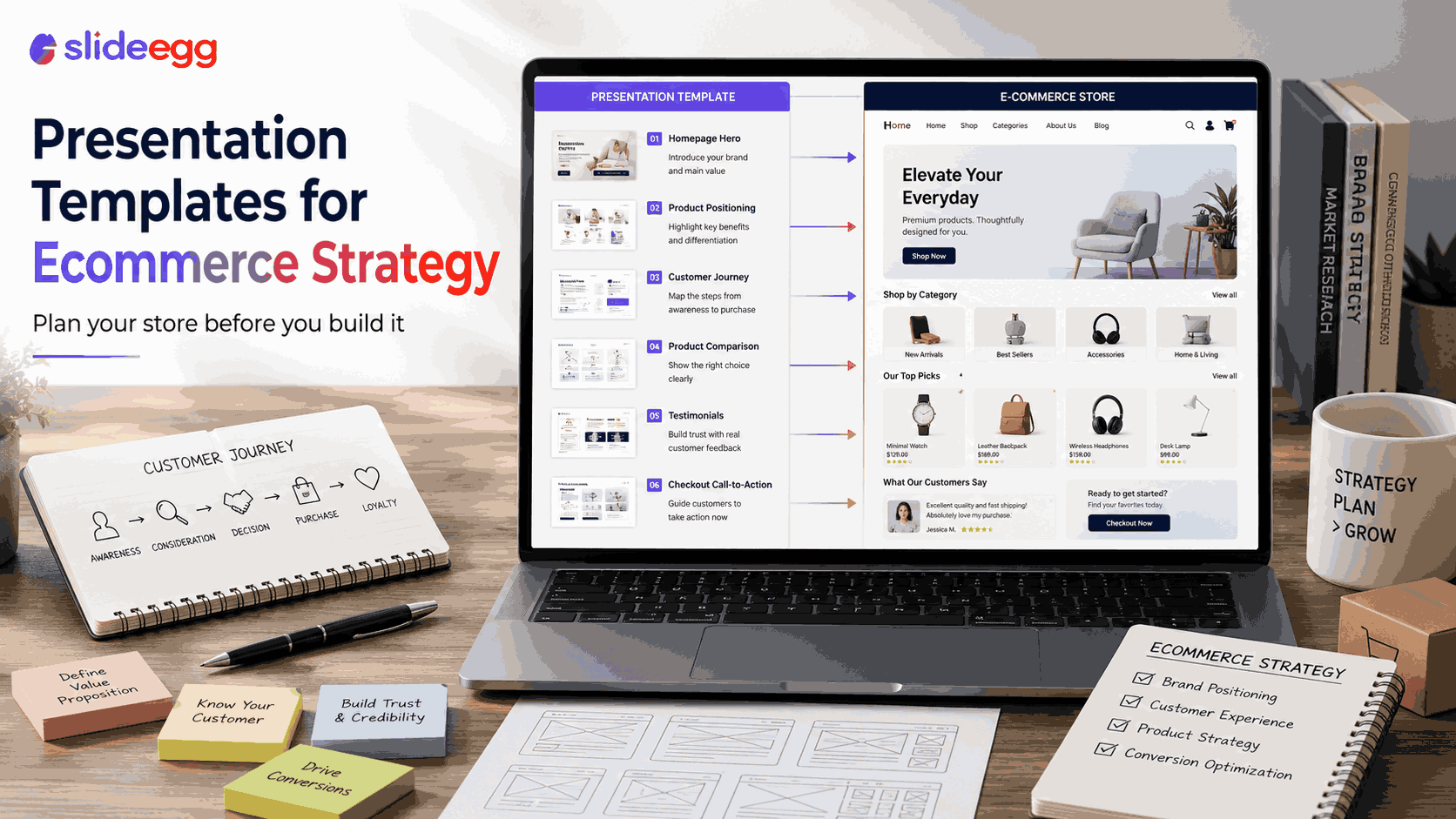
Think of your title slide as your homepage hero section. It needs a strong, attention-grabbing image and a clear, single-sentence explanation of what you sell. A slide that features a chart or a data table translates perfectly into a product comparison page. A bold, text-heavy slide with a distinct button shape mimics your call-to-action prompt at checkout.
When you map things out this way, you can easily review the flow of your ideas. Just by using the presentation modes in your software, you and your team can click through the “website” as if you were real customers. This helps you spot missing information or confusing transitions before you commit to a full web build. It is a highly practical, repeatable method for testing out structural ideas without spending a dime on development.
Mapping Your Customer Journey Through Slides Before You Build
Every successful store guides visitors through a specific narrative arc. We call this the customer journey. It generally moves through three phases: awareness, consideration, and conversion. A slide deck allows you to storyboard this exact experience step by step.
Start with the awareness phase. Your first few slides should focus on the immediate problem your product solves. Use a large hero image and clear benefits to hook the reader. Next, move into the consideration phase. Add a few slides that feature customer testimonials, detailed product specifications, and answers to frequently asked questions. You want to build trust and show why your solution works best.
Finally, end with the conversion phase. These slides should outline your pricing options, shipping details, and a clear “Buy Now” checkout prompt. When you storyboard this journey in a presentation, you ensure that every single step logically leads to the next. You never leave your customer wondering what they should do or where they should click.
Using a Strategy Deck to Brief Your Design and Copy Teams
If you are working with other people to launch your store, clear communication is everything. A completed strategy presentation acts as the ultimate creative brief. It keeps your designers, copywriters, and developers completely aligned from day one.
When everyone looks at the same slide deck, there is zero confusion about the goal of the website. Your copywriter knows exactly how much text they need to write for the homepage. Your designer understands which products need the most visual attention. Starting with free business plan and strategy presentations gives your team a highly structured jumping-off point.
Having this shared blueprint saves you hours of frustrating back-and-forth emails. You avoid scope creep and tone mismatches because all the major decisions are already documented. A well-built strategy deck drastically reduces revision cycles, keeps your team happy, and ensures your store launches right on schedule.
From Strategy Deck to Live Store – Making the Final Move
Once your presentation feels complete and your team is on the same page, translating that strategy into a live website becomes a breeze. Every decision you made in your slide deck maps directly onto your site setup.
Your presentation headers become your website navigation menu. The core products you grouped together on a slide become your website categories. The main talking points you bulleted out form your content pillars for your blog and social media. You have effectively built the skeleton of your business; you just need to add the skin.
With a beautiful, functional store in place, you can confidently turn your attention to e-commerce marketing. Since your website relies on a solid, well-planned foundation, every marketing dollar you spend will perform better. You have transformed a simple slide deck into a powerful customer acquisition engine.
Final Thoughts on Setting Up for Success
Presentation templates serve as much more than simple design tools. They are powerful strategic frameworks that help you think clearly and organize your ideas before you start building. By storyboarding your customer journey and aligning your team with a clear deck, you remove the guesswork from launching your store.
You already have brilliant ideas for your business. Now, take the time to map them out properly. Grab a presentation template, outline your perfect customer journey, and watch how quickly everything falls into place. Once your strategy is firmly set, you will know exactly which website design to choose to start making your first sales.



