Free - How to Rotate a Picture in Powerpoint Explained Visually




How To Rotate A Picture In Powerpoint — PowerPoint Template
How-to content needs step-by-step visual clarity. If the process isn't easy to follow on a slide, your audience won't follow it in real life.
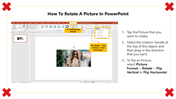
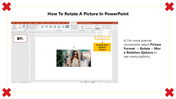
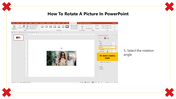
This How To Rotate A Picture In PowerPoint gives you an editable tips-focused slide set that's ready to use the moment you download it. The slide features tutorial on rotating a picture in PowerPoint, featuring a red circular icon with a rotation symbol. Drop it into your deck, replace the placeholder text, and you're done.
What's Inside
Actionable, clearly structured tip slides — open, edit, and present — text, colors, icons, and layout are all yours to adjust. Design variations include: How To Rotate Image In PowerPoint, How To Rotate Image On PowerPoint, How To Make A Picture Rotate. Match your brand, adapt the layout, change the colors — it takes minutes, not hours.
Who This Is For
Built for professionals, students, educators, and anyone who needs a polished, ready-to-use presentation template. No design background needed — just open, edit, and present.
Formats & Download
Available for PowerPoint. Download free — no account needed. Open it in your preferred app and start editing right away.
Key Features
- Fully editable — text, colors, icons, and layout
- Compatible with PowerPoint
- 16:9 widescreen format — presentation-ready
- Clean, professional design — no clutter
- Free — instant download access
Explore more How To Learning PPTs slides to find the right fit for your next presentation.










You May Also Like These PowerPoint Templates


