Free - Tutorial Of How To Imbed Video In PowerPoint Presentation


 Canva
Canva

Simple Guide To Embed Video In PowerPoint
Adding Video to PowerPoint can make your presentation more dynamic and engaging for your audience. A video can nudge your audience to act or take a specific action. It should be short, clear, and relatable to the audience. There are many uses for adding video to a PowerPoint SlideShow.
Embedding video in PowerPoint is very simple, and it needs only a few steps. This tutorial will guide you on how to embed video in a slideshow. Keep reading!
How To Embed Video In PowerPoint?
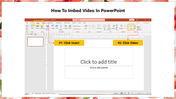
Step 1: Click Insert menu and Click Video.
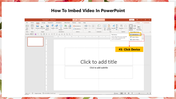
Step 2: Click the Device option.
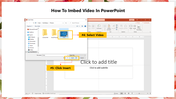
Step 3: Select the desired video and click Insert.
Now the required video is inserted in your slide.
You can easily embed your desired video in a PowerPoint slideshow by following these simple steps. Check out our How To Add Video To PowerPoint tutorial also.
Try SlideEgg! We provide you with a collection of ready-made PPT templates at an affordable cost. Our slides are of supreme quality and include high-definition images, vibrant colors, innovative designs, and has more amazing features.










You May Also Like These PowerPoint Templates


