Database Architecture Template For PPT And Google Slides




 Canva
Canva
Database Architecture Template For Presentations
Database architecture is a core topic for computer science students, software developers, IT trainers, and data professionals. Explaining it well requires a clear structure. This 15-slide deck is built for that exact purpose.
What the Slides Cover
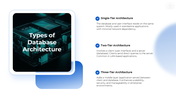
The deck starts with an introduction that defines database architecture as the framework governing how data is stored, managed, and accessed. It then moves through three architecture types. Single-tier keeps the database and interface on the same system. Two-tier separates the client from the server. Three-tier adds a middle application layer for enterprise-level scalability and security.
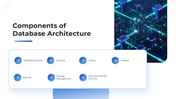
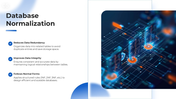
The components slide lists seven building blocks: database engine, schema, tables, indexes, queries, storage management, and users and access controls. Database normalization gets its own slide covering three principles, including reducing redundancy, improving data integrity, and applying normal forms (1NF, 2NF, 3NF).
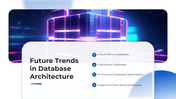
The future trends slide covers four directions the field is moving toward: cloud-native databases, distributed databases, AI-powered optimization, and graph and time-series databases. The conclusion ties it all together.
The white and blue theme uses high-quality 3D tech visuals on every slide. Layouts stay clean and readable. Each slide is editable and works well for classroom teaching, online sessions, and professional training.
Your next database architecture class deserves better than a blank slide. This deck is already waiting for your content. Try now!
Features of this template:
- Fully Customizable: Change any color, text, or logo to fit your presentation context.
- Cross-Platform Files: Native formats for PowerPoint, Google Slides, and Canva included.
- Screen-Ready Resolution: Optimized for both 16:9 widescreen and 4:3 standard display formats.
- Three-Tier Architecture Comparison Slide: Single, two, and three-tier types explained side by side with use cases.
- Seven-Component Grid Layout: All core database building blocks listed in one clean, scannable slide.
- Normalization Slide with Normal Forms: Covers 1NF, 2NF, and 3NF with plain-language explanations.
- Future Trends Slide with Named Technologies: Four specific trends labeled by name, including cloud-native and AI-powered optimization.
- High-Quality 3D Tech Visuals: Every slide uses rendered 3D database and server imagery, not generic flat icons.



You May Also Like These PowerPoint Templates



Showing36 of69,218 templates