A great presentation used to mean good content. In 2026, it means good content and a design that holds attention long enough for that content to land. Attention spans in meetings are shorter, hybrid audiences are more distracted, and the first three seconds of any slide now decide whether people lean in or check their phone. That’s exactly why picking one of the best Google Slides themes for your topic isn’t a cosmetic decision anymore — it’s part of how well your message actually gets across.
Google Slides has become the default tool for a lot of that work, and for good reason. It lives in the browser, syncs automatically, and lets a marketing team in three time zones edit the same deck without emailing a single file back and forth. But a blank Slides file still asks you to make a hundred small design decisions before you’ve written a word of content. A well-built theme answers most of those questions for you, so you can spend your time on the message instead of the margins.
This guide explains what Google Slides is, when it makes more sense than PowerPoint or Canva, and which themes suit common presentation goals in 2026. At SlideEgg, we reviewed these themes based on their slide structure, editing flexibility, practical use cases, visual clarity, and first-party view and download data—not simply how attractive they looked in a thumbnail.
What Is Google Slides?
Google Slides is Google’s free, browser-based presentation tool, the direct alternative to Microsoft PowerPoint. Instead of living on one laptop, your presentation lives in Google Drive, which changes how you actually work with it day to day.
A few things make it stick:
• It runs entirely in the browser. No installation, no version mismatches between your laptop and your colleague’s.
• It saves automatically to the cloud. There’s no “final_v3_FINAL.pptx” — one file, always current.
• Multiple people can edit at once. You can watch a teammate’s cursor move through the deck in real time and leave comments directly on a slide.
• It works from any device. Start a deck on your desktop at the office, tweak it on a tablet on the train, present it from a phone if you have to.
Google Slides is usually the better choice when several people need to review or edit the same presentation, when you need browser-based access from different devices, or when sharing a live link is more practical than sending files. PowerPoint may still be preferable for advanced desktop animations and offline-heavy workflows, while Canva is often more suitable for broader visual-design tasks.
Collaboration and cloud access solve the logistics of building a presentation, but they do not automatically produce a clear or professional deck. That is where a well-structured theme helps. Instead of deciding every font, margin, chart style, and content layout from scratch, you can begin with one of the free Google Slides themes and adapt the structure to your message.
PowerPoint vs Google Slides
PowerPoint and Google Slides are both popular presentation tools, but they serve different needs. PowerPoint offers advanced design features, animations, and offline editing, making it a strong choice for detailed business presentations. Google Slides focuses on cloud-based collaboration, allowing teams to create, edit, and share presentations in real time from any device.
When it comes to presentation themes, both platforms support professional templates. Many premium and free templates are available in Google Slides format, making it easy to create polished presentations for business, education, marketing, startups, and client meetings. If collaboration and accessibility are your priorities, Google Slides is an excellent choice. If you need advanced customization and complex animations, PowerPoint may be a better fit.
Ultimately, the best presentation depends less on the software you choose and more on selecting a theme that matches your content, audience, and presentation goals.
Why Choosing the Right Google Slides Theme Matters
It’s tempting to think themes are just decoration, but the right one is doing real work underneath the surface:
• It saves you hours. Building consistent title slides, section dividers, and chart layouts from scratch takes real time — time you probably don’t have the week before a pitch.
• It signals professionalism before anyone reads a word. People form an impression of your presentation (and, fairly or not, of you) in the first few seconds.
• It improves readability. Good themes are built around type hierarchy and spacing that’s actually easy to read from the back of a room or a small laptop screen in a video call.
• It keeps your branding consistent. The same fonts, colors, and layout logic repeated across every slide make a deck feel intentional instead of assembled in a hurry.
• It boosts engagement. Visual variety — icons, charts, well-placed images — gives your audience’s eyes somewhere to rest instead of another wall of bullet points.
• It makes complex information digestible. A theme built around comparison tables or process flows can turn a paragraph of explanation into something your audience understands at a glance.
How We Selected These Google Slides Themes
We did not choose these themes based on visual style alone. Each theme had to support a distinct and common presentation goal, provide a logical sequence of slides, allow practical customization, and include enough layouts to build a complete presentation without forcing unrelated content into the deck.
We also considered first-party view and download activity as an indicator of user interest. Those numbers are useful signals, but they are not the only reason a theme appears here. A less-downloaded theme can still be the better choice when its structure fits a specific task, such as enterprise risk analysis or business-case approval.
Five Google Slides Themes for Different Presentation Goals
The themes below weren’t picked by popularity alone. Each one was chosen because it solves a specific, recurring presentation problem — introducing a company, pitching investors, walking through a case study — rather than just looking nice in a thumbnail. Presentation purpose matters more than visual style here: a beautifully designed theme built for a sales pitch will still fight you if you try to force a risk-management report into it.
Here’s a quick look at what each one is built for before we go deeper on each:
| Theme | Best For | Main Strength |
| Company Profile | Business introductions | Complete company overview |
| Investor Pitch Deck | Startup fundraising | Investor-focused structure |
| Case Study | Results and success stories | Problem–solution–result flow |
| Enterprise Risk Management | Risk and compliance teams | Structured risk framework |
| Business Case | Project and investment proposals | Decision-making and implementation |
Company Profile Google Slides Theme

Source: Company Profile Google Slides Theme
A Complete Introduction to Your Business
The Company Profile Google Slides Theme brings the main parts of a business introduction into one consistent deck. It gives companies room to explain where they came from, what they do, what they are working toward, and who is responsible for delivering it.
Instead of combining unrelated slides from several sources, users can build a connected story covering company history, mission and vision, goals, services, internal processes, leadership, and contact details.
What the theme includes
- Company history and milestone layouts
- Mission, vision, values, and goals
- Service and product overviews
- Process and workflow diagrams
- Leadership and team introductions
- Charts, icons, and infographic layouts
- Contact and next-step slides
Where it works best
This theme suits client introductions, partnership meetings, company overviews, onboarding presentations, business conferences, and investor discussions where the audience needs to understand the organization before considering its proposal.
Viewed by more than 6.1K users and downloaded over 1.5K times, it has attracted consistent interest from people creating professional business introductions. Its main strength is coverage: users can present the company’s story, services, people, processes, and achievements without changing visual systems halfway through the deck.
For more options covering company milestones, leadership, services, and business achievements, explore company profile presentation templates.
Investor Pitch Deck Google Slides Theme

Source: Investor Pitch Deck Google Slides Theme
Built Around the Questions Investors Ask
An investor presentation is not a general company introduction. Investors want to understand the problem, the proposed solution, the size of the opportunity, the business model, the competitive position, the financial direction, and the funding requirement.
This Investor Pitch Deck Theme follows that decision-making sequence rather than filling the deck with decorative company information.
Core fundraising slides include:
- Problem and solution
- Market opportunity and growth potential
- Target audience and market strategy
- Mission and vision
- Competitive or SWOT analysis
- Pricing and business direction
- Investment highlights
- Funding requirements
- Financial and growth information
The structure is suitable for startup funding rounds, accelerator applications, venture-capital meetings, demo days, pitch competitions, and strategic partnership discussions.
The theme has been viewed by 731 users and downloaded 146 times. Its value is not based on download volume alone. It stands out because it keeps the presentation focused on the information investors need to assess the opportunity.
Founders who need additional fundraising structures can compare more pitch deck templates for startup, investor, and business presentations.
Case Study Google Slides Theme
Source: Case Study Google Slides Theme
A Clear Problem-to-Result Narrative
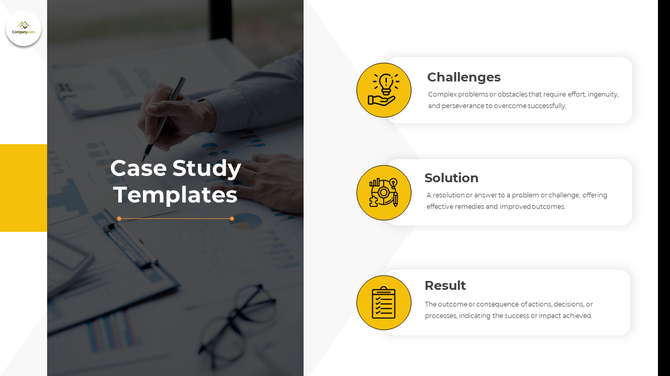
Case studies work when the audience can follow what happened, why it mattered, what action was taken, and what changed as a result. This theme supports that narrative through a direct challenge–solution–result flow.
Rather than presenting evidence as disconnected charts and observations, the layouts help users build a sequence:
- Introduce the situation or client.
- Define the central problem.
- Explain the chosen approach.
- Present the implementation.
- Show measurable outcomes.
- Summarize the lessons or next steps.
The theme is particularly useful for consultants, marketing teams, educators, project managers, and businesses presenting client success stories. It can support campaign reviews, project outcomes, training examples, consulting reports, workshops, and internal performance presentations.
With more than 8.7K views and over 3.2K downloads, it is the most downloaded option in this roundup. Its appeal comes from a structure that can be reused across industries without losing the logic of the story.
More specialized layouts are available in case study presentation templates, including business, marketing, medical, engineering, and educational examples.
Enterprise Risk Management Google Slides Theme

Source: Enterprise Risk Management Google Slides Theme
Best for Framework-Heavy Risk Presentations
Enterprise risk management is difficult to explain when risk categories, responsibilities, assessment methods, controls, and monitoring systems are presented as separate topics. This theme turns those connected elements into a structured framework.
It can help organizations map:
- Strategic, operational, financial, compliance, and reputational risks
- Governance and organizational culture
- Risk ownership and responsibilities
- Assessment and prioritization methods
- Monitoring and reporting systems
- Mitigation measures
- Implementation stages
- Expected organizational benefits
The deck is most relevant to risk managers, compliance teams, senior executives, consultants, auditors, and employees participating in internal risk training.
It can be used in executive risk reviews, governance meetings, compliance workshops, internal training, risk-assessment exercises, and implementation-planning sessions.
The theme has received 327 views and 167 downloads. Those figures are lower than the broader Company Profile and Case Study themes, but that is expected for a specialized subject. It was selected because it gives a complex operational topic a logical flow rather than reducing risk management to a collection of generic warning icons.
Business Case Google Slides Theme
Source: Business Case Google Slides Theme
Designed to Support an Approval Decision
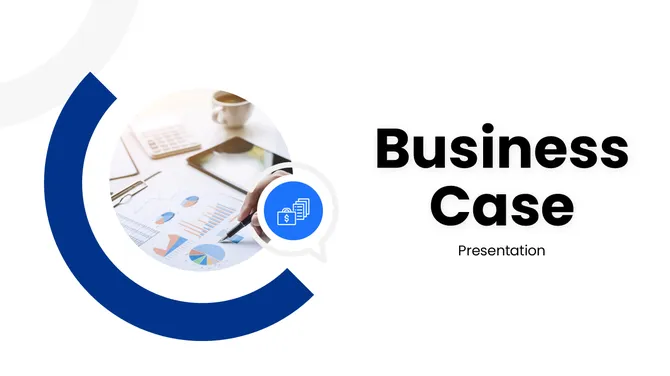
A business case has a specific job: give decision-makers enough evidence to approve, reject, fund, or revise a proposed initiative. This theme is structured around that decision rather than around a general company story.
The deck gives teams space to present:
- An executive summary
- The current business problem
- Root causes and supporting evidence
- The proposed solution
- Objectives and success criteria
- Scope and deliverables
- Financial or customer analysis
- Risks and mitigation measures
- Implementation phases
- Milestones and KPIs
- Expected outcomes
It is a practical choice for project managers, consultants, executives, department leads, and teams requesting funding or organizational support.
Typical applications include process-improvement proposals, technology investments, internal transformation projects, partnership proposals, customer-analysis presentations, and new business initiatives.
Although the theme has a smaller first-party audience—69 views and 17 downloads—it addresses one of the most important presentation tasks in business: helping leaders evaluate whether an initiative deserves resources. Its combination of strategic analysis and implementation planning makes it more useful than a visually impressive theme with no approval structure.
Additional decision-focused layouts are available in business case presentation templates.
How to Choose the Best Google Slides Theme
With five distinct options above, the real question is which theme best fits your presentation goal. A few factors make that decision easier:
• Audience. Are you presenting to investors, executives, students, or clients? Each expects a different pace and depth of information.
• Presentation purpose. Are you introducing, persuading, reporting, or requesting approval? The theme’s built-in structure should match that goal.
• Industry. A wellness brand and a compliance team need visibly different visual languages, even if the underlying slide count is similar.
• Brand identity. Consider how easily you can swap a theme’s default colors and fonts for your own without breaking its layout logic.
• Slide complexity. If your content is data-heavy, prioritize themes with built-in chart and comparison layouts over ones built mainly for narrative flow.
• Storytelling needs. Themes like Case Study are built around narrative arcs; themes like Enterprise Risk Management are built around frameworks. Match the shape to your content, not the other way around.
• Data visualization. Check whether a theme’s chart placeholders actually fit the kind of data you’re presenting before committing to it.
• Accessibility. Favor high-contrast color combinations and legible type sizes, especially if the deck will be viewed on a shared screen in a large room or a small laptop in a video call.
If you’re still weighing a template-based approach against an AI-generated one, it’s worth reading how AI presentation makers compare to templates before you commit your time either way.
How to Use Each Theme More Effectively
Company Profile Theme
Focus on the information the audience needs for the current meeting. A potential client may need services, experience, processes, and proof of results, while a new employee may need values, team structure, and company goals.
Investor Pitch Deck Theme
Keep every slide connected to the investment case. Remove decorative slides that do not strengthen the problem, opportunity, traction, business model, competitive advantage, or funding request.
Case Study Theme
Maintain a clear sequence from challenge to action to result. Do not present the final outcome before explaining what was changed and why.
Enterprise Risk Management Theme
Use consistent terminology, scoring, and risk categories. Each major risk should clearly show its impact, likelihood, owner, mitigation plan, and current status.
Business Case Theme
Keep the requested decision visible throughout the deck. The financial analysis, risks, implementation stages, and expected benefits should all support that decision.
Frequently Asked Questions
What is the best Google Slides theme for business presentations?
It depends on what the presentation needs to do. Use a Company Profile theme when you’re introducing your business for the first time, a Business Case theme when you need sign-off on a project, and an Investor Pitch Deck theme when you’re raising funding. The right choice comes down to what your audience needs to walk away understanding or approving — not which theme looks the most polished in isolation.
Are Google Slides themes free?
Some are, and some require a premium license. Free themes sometimes come with attribution requirements, download limits, or restrictions on commercial use, so it’s worth checking the licensing terms on the specific template page before using it for client work or anything you plan to publish externally.
Can I customize Google Slides themes?
Yes. You can customize Google Slides themes by changing colors, fonts, backgrounds, layouts, images, icons, and text styles. You can also edit the theme builder to apply consistent branding across every slide.
Which Google Slides theme is best for students?
Look for education-focused themes with clean typography, simple layouts, and enough room for research findings, images, and citations. These work well for classroom projects, group assignments, academic competitions, and subject-based reports where clarity matters more than visual flair. A curated list of the best free templates for students is a good place to compare options built specifically for coursework.
What’s the difference between a Google Slides theme and a template?
A theme sets the overall visual system — colors, fonts, backgrounds, and layout style — that carries across a presentation. A template builds on that visual system with pre-structured slides and content designed for a specific purpose, like a pitch deck, a case study, or a company profile. In short: the theme is the design language, and the template is that language already applied to a real structure.
Which Google Slides theme is best for startup fundraising?
An Investor Pitch Deck theme is usually the best option because it follows the information investors expect, including the problem, solution, market opportunity, business model, traction, competition, financial direction, and funding request.
Is a Business Case theme suitable for internal presentations?
Yes. A Business Case theme works well for internal funding requests, technology investments, process improvements, resource proposals, and transformation projects. The presentation should clearly state the decision required from the audience.
Which theme should I use to present project results?
A Case Study theme is suitable when you need to explain the original challenge, the action taken, and the measurable outcome. It works best when you have clear before-and-after evidence.
Can these themes be used in PowerPoint or Canva?
Format availability depends on the individual template. Some themes support PowerPoint and Google Slides, while others may also include Canva-compatible versions. Check the specific template page before downloading.
Can I edit Google Slides themes on a mobile device?
Google Slides supports mobile editing, but detailed layout changes are easier on a desktop or laptop. Mobile editing is more suitable for reviewing slides, correcting text, leaving comments, and making small updates.
Which Google Slides Theme Fits Your Presentation?
The best Google Slides theme is not necessarily the one with the most elaborate design or the highest download count. It is the one whose structure matches the presentation’s purpose.
Use the Company Profile theme to introduce an organization, the Investor Pitch Deck to raise funding, the Case Study theme to present measurable results, the Enterprise Risk Management theme to explain organizational risks, and the Business Case theme to support an approval decision.
Start with the outcome you need from the audience. Then choose the theme whose structure naturally leads to that outcome. When the presentation goal and slide structure match, the deck becomes easier to build, present, and understand..