Capability Maturity Model Integration Canva Templates

 Canva
Canva
Capability Maturity Model Integration PowerPoint, Google Slides, and Canva Template
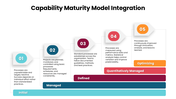
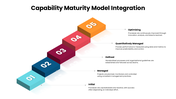
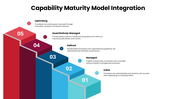
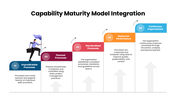
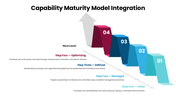
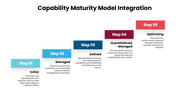
Why does the same CMMI slide never work for two different audiences? Because a board update, a training session, and a maturity-assessment conversation all need the model explained differently — and that's the gap this template closes. Instead of one static diagram, it hands you seven distinct ways to visualize the same five-level framework: Initial, Managed, Defined, Quantitatively Managed, and Optimizing. Browse more process PowerPoint templates to round out your process improvement or quality management presentation.
Each level carries a consistent, one-line definition throughout the deck — Initial means success rides on individual effort with no real process behind it; Managed means projects get planned, monitored, and controlled; Defined means standardized practices actually hold across teams; Quantitatively Managed means performance gets tracked with real data instead of gut feel; Optimizing means improvement never stops. What shifts from slide to slide is the visual: a clean arc layout for an executive summary, a numbered step sequence for a training walkthrough, a staircase that makes the climb from reactive to optimized feel physical rather than abstract, and a "Next Level" framing built specifically for showing a team exactly where they stand today.
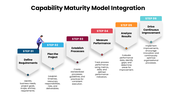
One slide breaks from the model entirely to cover the mechanics of getting there — a six-step implementation sequence running from defining requirements through planning, establishing processes, measuring performance, analyzing results, and driving continuous improvement.
Built for process improvement consultants, quality management teams, software engineering leads, and any organization prepping for a CMMI appraise that which needs the same five levels ready to present in whichever format the room calls for. Every level, label, and step is yours to edit.
Features of this template
- 100% customizable slides and easy to download.
- The slides contain 16:9 and 4:3 formats.
- Easy to change the colors quickly.
- Highly compatible with PowerPoint, Google Slides, and Canva templates.










You May Also Like These PowerPoint Templates
Showing20 of69,218 templates