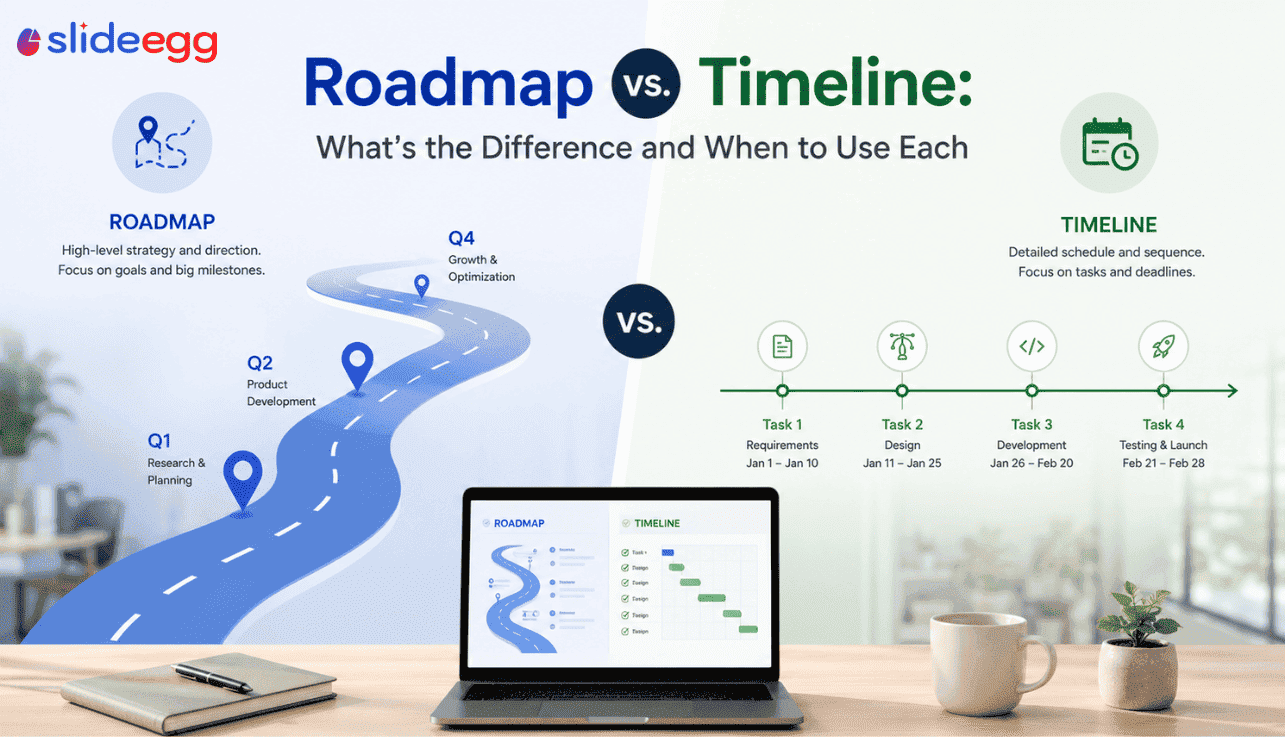
Both show progress over time — but they tell completely different stories. Choosing the wrong one for your presentation can confuse your audience before you’ve said a word.
When you’re planning a presentation, one of the most common questions is: “Should this be a roadmap or a timeline?” They look similar on a slide. Both have a visual progression from left to right. Both show steps, phases, or milestones. But they serve fundamentally different purposes — and using the wrong one will send the wrong message to your audience.
This guide explains exactly what separates a roadmap from a timeline, when each is appropriate, and which template to use for each situation.
The Core Difference: Strategy vs. Schedule
The simplest way to distinguish the two:
“A roadmap answers: Where are we going and why? A timeline answers: When is each step happening?“
| Factor | Roadmap | Timeline |
| Primary Purpose | Show strategic direction, goals, and phases | Show specific events, dates, and durations |
| Level of Detail | High-level — phases and milestones only | Detailed — specific dates, tasks, and durations |
| Time Specificity | Flexible — can be quarters, years, or vague phases | Precise — tied to specific dates or date ranges |
| Primary Audience | Executives, stakeholders, investors, leadership | Project teams, operational managers, clients |
| When It Changes | Changes as strategy evolves (quarterly reviews) | Changes as tasks are completed or delayed |
| Best Format | Winding road, swimlane, milestone circles | Gantt bar chart, horizontal arrow, event markers |
| Contains | Goals, phases, key decisions, outcomes | Tasks, deadlines, start/end dates, dependencies |
When to Use a Roadmap Presentation
Use a roadmap when your audience needs to understand the big picture — direction, priorities, and why certain things are happening in a certain order. Roadmaps are about communication and alignment, not tracking.
Use a Roadmap When:
- You’re presenting a product strategy to leadership or investors who need vision, not task details
- You’re communicating a multi-quarter company plan at an all-hands where every department is present
- You’re showing a digital transformation or change management plan where the “why” matters as much as the “what”
- You’re onboarding stakeholders who are new to a project and need context, not tasks
- You’re doing a quarterly business review and need to show strategic progress without operational noise
For these situations, browse SlideEgg’s roadmap templates — including strategic roadmap templates and product roadmap templates.
When to Use a Timeline Presentation
Use a timeline when your audience needs to see specific dates, durations, and sequences. Timelines are for accountability and scheduling — they answer “when” with precision.
Use a Timeline When:
- You’re presenting a project schedule to a client who needs to know exact delivery dates
- You’re mapping a historical overview — company history, market events, or product evolution
- You need to show task dependencies — where one step must be completed before another starts
- You’re presenting a legal or compliance schedule with regulatory deadlines
- You’re tracking sprint timelines or release cycles in an agile development context
For timeline slides, browse SlideEgg’s timeline roadmap templates — designed for date-specific project presentations.
Can You Use Both in the Same Presentation?
Absolutely — and for complex stakeholder presentations, you often should. A common, effective structure is:
- Slide 1: The Roadmap — shows the strategic direction, 3–4 major phases, and big outcomes. This is the “north star” slide.
- Slide 2: The Timeline — zooms into the next 90 days with specific dates, milestones, and owners. This is the “execution” slide.
This combination gives executives the vision they need while giving your team the operational detail they need — without cluttering either slide.
Lead with the roadmap, follow with the timeline. The roadmap creates buy-in; the timeline shows credibility. In most stakeholder presentations, the roadmap does more persuasive work than any timeline ever will.
Visual Differences: What Each Looks Like on a Slide
What a Roadmap Slide Looks Like
Roadmap slides typically feature: a winding road or horizontal path visual, milestone circles or signposts, phase labels (not specific dates), and color-coded stages. The focus is on where you’re going, not exactly when each turn happens.
What a Timeline Slide Looks Like
Timeline slides typically feature: a straight horizontal axis with date markers, bars or arrows showing task durations, specific month/week labels, and event markers tied to exact dates. The focus is on when things happen and in what sequence.
Quick Decision Guide
| Your Situation | Use This | Template Suggestion |
| Presenting strategy to the board | Roadmap | Strategic Roadmap |
| Showing a product launch plan to PM team | Roadmap + Timeline | Product Roadmap |
| Delivering a project schedule to a client | Timeline | Timeline Roadmap |
| All-hands company direction update | Roadmap | Roadmap Templates |
| IT deployment schedule with deadlines | Timeline | IT Roadmap |
| Marketing campaign planning | Roadmap | Marketing Roadmap |
Whether you need a roadmap or a timeline — SlideEgg has free templates for both. Download, edit, and present in minutes.