Most people frame this as a fight between old and new. AI tools on one side, traditional templates on the other. The reality is less dramatic — and more useful.
AI presentation makers and slide templates don’t compete for the same job. They solve different problems at different moments in the same workflow. The question isn’t which one is better in general — it’s which one is right for your specific situation, your deadline, your audience, and what you already have to work with.
This article answers that question directly. We pull from research across 500+ real user comments, expert analysis, and current tool comparisons published in 2026. No promotional framing. Just a clear breakdown of when each approach serves you and when it doesn’t.
Quick Answer
- Use AI when you need a structured first draft quickly and don’t yet know what your presentation should look like.
- Use templates when you know what you want to say, need brand control, or are building something you’ll reuse.
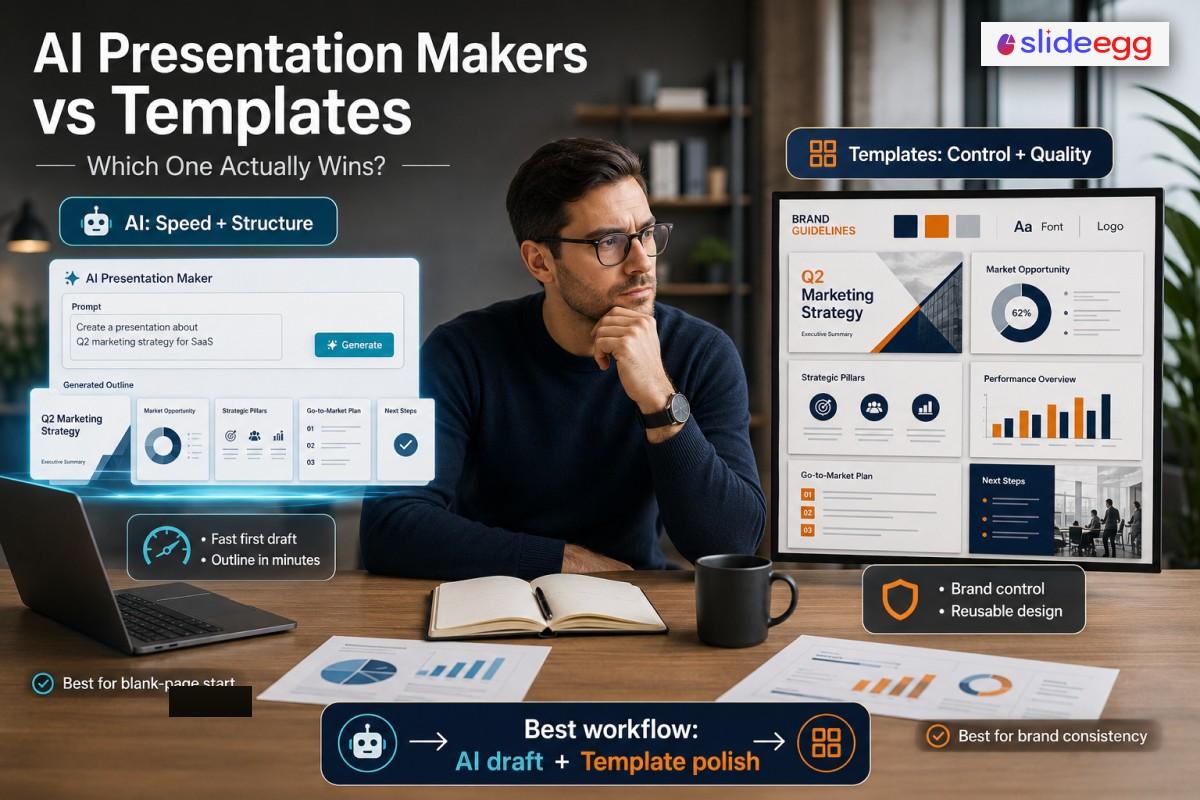
- Use both in sequence — AI for the outline and draft, a professional template for the design layer — when you need speed and quality. This is what most experienced presenters actually do.
What We’re Actually Comparing
Before going head to head, it helps to be clear about what each approach involves.
What Is an AI Presentation Maker?
An AI presentation maker takes a text prompt — a topic, a document, a URL, or a rough outline — and generates a complete slide deck automatically. The AI handles slide count, structure, written content, image selection, and layout. Tools like Gamma, Canva Magic Design, Plus AI, and SlideEgg AI all fall in this category, though they work differently under the hood.
Research from 24Slides identifies two technical architectures behind most AI tools:
- Template injectors (Canva, Microsoft Copilot): The AI fills pre-built slide templates with your content. Brand-consistent and structurally safe, but rigid — if your content doesn’t fit the template’s layout, the text overflows or gets compressed rather than the layout adapting.
- Liquid canvas builders (Gamma): The AI generates slides using web code, creating fluid layouts that adapt to content volume. Visually clean immediately, but the web-native format causes PowerPoint export problems because the slides are built like websites, not like PowerPoint files.
What Is a Presentation Template?
A presentation template is a pre-designed slide framework — layouts, color schemes, typography, and placeholder elements — that you fill with your own content. Templates range from single-slide layouts to complete multi-slide decks organized around specific use cases (pitch deck, quarterly review, training module, etc.).
Template libraries like SlideEgg offer 200,000+ designs across PowerPoint, Google Slides, and Canva formats, covering virtually every business, education, and creative use case. You bring the content; the template handles the visual structure.
Where the Line Blurs
The cleanest distinction between AI tools and templates is increasingly theoretical. SlideEgg’s AI maker, for example, uses its professional template library as the design foundation for AI-generated output — so you get the speed of AI generation with the visual quality of a purpose-built template. This hybrid model is becoming the more common product direction, not the exception.
Head-to-Head: 10 Dimensions Compared
| Dimension | AI Presentation Makers | Presentation Templates | Winner |
| Speed to first draft | 30 seconds to 2 minutes for a complete deck from a prompt | You design slide by slide; 30–90 minutes for a complete deck depending on skill | AI |
| Design quality ceiling | Consistent but recognizable. AI aesthetics are visually modern but often generic. Liquid canvas tools can’t “break the grid” — elements use relative positioning that prohibits overlapping or layering for creative effect. | Unlimited if you choose a professionally designed template. You control every element, every pixel. | Templates |
| Brand consistency | Partial. Template-injector tools (Canva, Copilot) enforce brand if you feed them your templates. Liquid canvas tools (Gamma) treat your brand as a “vibe” — prioritizing aesthetics over specific hex codes, font rules, or logo placement. | Complete. A professionally built template enforces brand by design — every layout, color, and font choice is defined before anyone opens the file. | Templates |
| Customization control | Theme-level on most tools. You can change colors and fonts. You cannot freely reposition elements, layer objects, or break the layout structure the AI created. | Total. Move any element anywhere, layer objects, apply custom animations, create depth effects. | Templates |
| Content accuracy | Unreliable without fact-checking. AI tools routinely generate plausible-sounding statistics, citations, and quotes that don’t exist. Every AI-generated number needs verification before the deck leaves your desk. | Not applicable — templates don’t generate content. You write what goes in. What you put in is what comes out. | Templates |
| Learning curve | Near-zero. Describe your topic, the AI handles everything else. No design decisions required. | Low to moderate. Choosing and adapting a template requires some design judgment — which layout, which color scheme, how to handle text overflow. | AI |
| Reusability | Low. AI-generated decks are typically one-off. Re-running the AI on the same topic produces a different result each time, which is useful for variety but undermines repeatability. | High. A well-built template is the foundation for every future presentation of the same type. Your quarterly review template from Q1 becomes your Q2 starting point with zero redesign. | Templates |
| Cost over time | $9–$25/month for individual paid plans (Gamma, Plus AI, Canva Pro). Credit limits mean heavy users pay more or hit walls. No perpetual access on most platforms. | Free options exist (SlideEgg free tier: 10 PPT/day). Paid template libraries start low; SlideEgg’s $299 lifetime plan provides unlimited access with no recurring cost. | Templates |
| PowerPoint export fidelity | Varies significantly. Liquid canvas tools (Gamma) routinely break on export — fonts substitute, layouts shift, spacing changes. Budget 15–45 minutes of cleanup for client-facing .pptx files. Template-injector tools export more cleanly. | Templates built natively in PowerPoint export perfectly — they are PowerPoint. Google Slides and Canva templates export to .pptx with minor formatting caveats on complex designs. | Templates |
| Narrative coherence | Inconsistent. AI generates each slide somewhat independently. Research from 24Slides documents “visual thread” failures — Slide 1 may use moody, dark photography while Slide 7 suddenly switches to bright 3D renders with no design rationale. | Inherent. A template defines a consistent visual language across all slides. The narrative coherence depends on the template quality — a well-designed template enforces visual consistency by structure. | Templates |
Templates win 8 of 10 dimensions on paper. That doesn’t make AI tools less useful — it means they solve a different problem. Read on for the specific scenarios where AI is the right call.
When AI Presentation Makers Win
Despite losing most of the head-to-head metrics, AI tools are the right choice in specific, common situations:
⚡ You Need a First Draft Now
- Meeting in 20 minutes
- Raw notes that need structure
- No idea where to start
- Internal audience that won’t judge design closely
Gamma generates a complete 10-slide deck from a prompt in under 60 seconds. No template can match that speed.
✍️ You’re Stuck on the Blank Page
- Know your topic, not your structure
- Need a logical slide sequence suggested
- Want talking points before designing
- Drafting a new presentation type you’ve never built
AI is the best cure for blank-page paralysis. Use it to get 70% of the structure, then take over.
📄 Converting Documents to Slides
- Word doc, PDF, or report to turn into slides
- Meeting notes → team update deck
- Research paper → summary presentation
- Strategy doc → board presentation outline
Plus AI and Copilot in PowerPoint both accept document uploads and extract key points into a logical slide structure — a task template cannot help with at all.
🔗 Web-Based Sharing and Analytics
- Sharing with external stakeholders via link
- Want to know which slides held attention
- Content won’t be presented live — it’s async
- Sales deck sent to prospects for review
Gamma’s built-in analytics track viewer engagement per slide. Templates in PowerPoint have no equivalent capability.
🎤 Speaker Notes at Scale
- Need talking points for every slide, not just slide content
- Building training materials for others to deliver
- Preparing for a complex topic you’ll present live
Both Gamma and Microsoft Copilot generate contextual speaker notes that expand on slide content rather than restating it — saving significant prep time. Templates can’t generate notes; you write them manually.
When Presentation Templates Win
Templates are the right choice — and often the only practical choice — in these situations:
🎯 High-Stakes Audience
- Investor pitch
- Board presentation
- Conference keynote
- Client proposal
AI output is visually competent but experienced audiences recognize it. A professionally designed template, filled with your specific content, looks exactly like your company — not like a tool generated by it.
🏷️ Brand Compliance Is Non-Negotiable
- Client-facing materials
- Sales decks across a large team
- Any presentation with specific hex codes, logo rules, or font guidelines
AI tools treat brand rules as suggestions. Templates built on your brand identity enforce them by structure — there’s no way to accidentally use the wrong font if the template only contains the right one.
📊 Data-Heavy Content
- Financial charts and tables
- Technical architecture diagrams
- Data comparisons requiring precise layout
- Any slide where every number needs to be verified
Templates don’t invent data. AI tools do. In regulated industries or any context where you’ll be challenged on a number, building on a template where every value is yours is significantly safer.
🔁 Repeating Presentation Types
- Weekly team update (same structure, new numbers)
- Monthly client report
- Quarterly review deck
- Standard proposal format
A template built for one quarterly review becomes your starting point for every future review. The AI has to start from scratch each time — the template gets faster with every iteration.
🎨 Highly Visual or Design-Led Work
- Brand presentations
- Product launch decks
- Portfolio showcases
- Creative pitches
AI tools use relative positioning — elements can’t overlap, layer, or break the grid. A professional template lets you create depth, use negative space, and layer visuals in ways AI cannot replicate.
💻 PowerPoint Native Delivery
- Final file delivered as .pptx
- Client or employer expects an editable PowerPoint
- Needs to run on any computer without formatting shifts
Templates built in PowerPoint export perfectly because they are PowerPoint. Most AI tools introduce export friction that requires cleanup time ranging from 15 minutes (Canva) to 45 minutes (Gamma) per deck.
The Hybrid Workflow: How Experienced Presenters Actually Work
Reddit analysis of 500+ comments across r/productivity, r/startups, and r/Entrepreneur surfaces a consistent pattern: professionals don’t choose between AI and templates. They use both in sequence. One Reddit user in r/Entrepreneur described their workflow as: “Gamma for first draft because nothing else is as fast. Beautiful.ai or a custom template for the final .pptx because Gamma’s export is broken.”
This approach — AI for content scaffolding, template for design quality — is how you get speed without sacrificing the professional finish that high-stakes presentations require.
1. Generate the outline with AI
Feed your topic, document, or notes into Gamma, SlideEgg AI, or Plus AI. Let the AI produce the slide structure, key points, and speaker notes. Don’t worry about the design — you’re extracting the skeleton, not the final product. This takes 60–90 seconds.
2. Verify every statistic and claim
Before touching the design, audit every number, quote, and citation the AI generated. Cross-reference against your source data or authoritative sources. Remove or replace anything you can’t verify. This step is non-optional for any presentation that will be challenged.
3. Apply a professional template
Choose a template that matches your content type (pitch deck, report, training module, etc.) and audience (investors, internal team, clients). Transfer the AI-generated structure and verified content into the template. The template handles visual hierarchy, brand consistency, and layout integrity — things AI cannot reliably control.
4. Rewrite AI-generated text in your voice
AI phrasing is recognizable and generic. Replace the bullet points with language that sounds like your organization, uses your specific terminology, and addresses your specific audience’s concerns. The AI gave you the structure; the words should be yours.
5. Export in your required format
If working from a PowerPoint or Google Slides template, export is direct. If you used an AI tool for the initial draft and a template for the redesign, the final file comes from your template environment — no AI export cleanup required.
The Hybrid Model in One Tool: SlideEgg AI
SlideEgg’s AI maker implements this hybrid approach natively. The AI generates presentation content across Education, Business, Creative, and Training categories — but uses SlideEgg’s professional template library as the design foundation rather than building from AI-generated layouts. You get prompt-to-deck speed without the generic aesthetic that comes from purely AI-generated design. The result skips steps 3 and 4 of the hybrid workflow above because the template quality is already baked in at generation time.
For users who want to avoid the “generate with AI, then fix the design” cycle, this integrated approach is worth evaluating directly.
Four Things AI Presentation Tools Still Cannot Do in 2026
Based on 24Slides’ research (testing AI tools against professional designers across 1.8 million slides) and consistent Reddit feedback, these specific capabilities remain outside what AI presentation tools reliably deliver:
1. Strategic Visual Framing
AI sees data as a math problem. It will visualize poor sales figures with a large red chart pointing down — technically accurate, strategically disastrous. A professional template, designed by someone who understands presentation strategy, frames data within a narrative structure where the visual hierarchy emphasizes the right thing. AI lacks what 24Slides researchers call “visual empathy” — the ability to weigh the political or strategic cost of a design choice.
2. True Brand Identity (vs. Brand Vibes)
AI is excellent at aesthetic moods — minimalist, corporate, creative, bold. It’s poor at specific brand identity. If your brand requires a specific shade of orange (#F4622A), a logo placed precisely 12px from the slide edge, and a typeface with specific weight rules, AI tools will approximate the feel but violate the rules. Generative models prioritize what looks good over what is correct. Templates built on your brand identity have no such ambiguity.
3. Consistent Visual Thread Across All Slides
AI generates slides somewhat independently, without a persistent memory of the visual decisions made on earlier slides. 24Slides documented this in testing Pitch AI: early slides used moody dark photography, later slides suddenly shifted to bright 3D renders with no design rationale. A professional template eliminates this problem by defining the visual language for every slide before content enters it.
4. Academic and Scientific Rigor
AI tools fabricate citations. In tests and user reports, AI presentation tools have generated paper titles, DOIs, and author names for sources that don’t exist. For academic presentations, conference talks, or any professional context where you’ll be asked to cite your sources, AI content generation requires thorough fact-checking before a single slide is shared. Templates don’t generate content — this problem doesn’t apply.
Frequently Asked Questions
Is it faster to use AI or a template for presentations?
AI is faster for the first draft — Gamma generates a complete deck in under 60 seconds. But AI output typically needs 1–2 hours of editing before it’s audience-ready. A template with content you’ve already written can be finished in 30–45 minutes. Total time from blank page to final deck is often closer than it appears.
Do AI-generated presentations look professional?
For internal audiences, yes. For external audiences — clients, investors, conference attendees — experienced viewers increasingly recognize AI aesthetics: the same layout patterns, the same stock imagery. AI also flattens visual hierarchy and loses design consistency across slides. High-stakes presentations need a professional template or significant redesign on top of AI output.
Can you use AI tools with PowerPoint templates?
Yes — and this is the most practical approach. Plus AI and Microsoft Copilot generate content directly inside PowerPoint, working within your existing templates with no export step. For Gamma or Canva AI, the workflow is: generate draft, export to .pptx, reformat within your template. Either way, combining AI with your template produces better results than either alone.
Are free presentation templates better than AI tools for students?
Depends on the task. Free templates (SlideEgg: 10 PPT/day) work better for data-driven or citation-heavy academic presentations. Free AI tools (Gamma: 400 one-time credits) are better for structuring a new topic from scratch. One firm rule: AI tools fabricate citations. Always verify any AI-generated source reference before submitting academic work.
What is the difference between Canva AI and Canva templates?
Canva AI (Magic Design) generates a presentation draft from a text prompt — it selects a template and fills it with AI-written content automatically. Canva templates are the pre-designed layouts you browse and fill manually. Same design library, different input method. AI is faster to start; manual templates give you more control over the final output.
Can AI presentation tools replace professional presentation designers?
For routine internal work — briefings, reports, team updates — AI is good enough without a designer. For board presentations, investor pitches, or brand-critical materials, the gap remains meaningful. AI can’t do strategic visual framing, enforce true brand identity, or maintain a consistent visual thread across a complex deck. Templates and designers still add value in those contexts.
Do templates work better than AI for data-heavy presentations?
Yes. Templates don’t generate data — every number in your deck is one you put there. AI tools fabricate statistics that look plausible but may be wrong. For financial reports, technical presentations, or any deck where you’ll be challenged on specific figures, templates eliminate the hallucination risk entirely. Data layout control is also more precise in templates.
Are AI presentations safe to use for client-facing work?
With editing, yes. Straight out of the AI, no — fabricated statistics and generic phrasing are both risks clients will notice. The safe approach: use AI for structure, verify every data point, rewrite copy in your organization’s voice, and apply your brand template before sharing. Don’t ship AI output unedited to an external audience.
What is a hybrid presentation workflow?
Use AI to generate the content structure and first-draft text, verify all statistics, then apply a professional template for the design layer. Rewrite AI copy in your own voice and export from the template environment. This gives you AI’s speed advantage without sacrificing design quality or brand consistency — and it’s how most experienced users actually work.
Which is better for non-English presentations — AI or templates?
Canva AI has the strongest multilingual support — built-in translation across 100+ languages. Gamma and Plus AI generate in most languages but with more variable quality. Template libraries are language-neutral: the design is the same regardless of what language you write in. For multilingual teams, Canva AI is the most practical AI option; any template library works equally in any language.
The Verdict: A Decision Framework, Not a Single Answer
Asking “AI or templates?” is the wrong question. The useful question is: what do I need right now, and what am I starting with?
Use AI When You Need To:
- Generate a structured first draft from a prompt or document
- Get 70% of the work done in under 5 minutes
- Create a one-off internal presentation without reuse plans
- Convert existing documents or notes into a slide structure
- Generate speaker notes at scale
- Share via link with viewer analytics
Use Templates When You Need To:
- Maintain brand consistency across slides and team members
- Present to an audience that will judge design quality
- Build something you will reuse across multiple presentations
- Deliver a clean, editable .pptx without formatting cleanup
- Present verified data without AI hallucination risk
- Break the grid with custom layouts and visual depth
For most professional use cases, the answer is both — in sequence. AI generates the content scaffold; a professional template provides the design layer. SlideEgg’s AI maker integrates this hybrid approach natively by using professional templates as the design foundation for AI-generated content, giving you the speed of AI without the design compromise.
The bottom line:
Neither AI tools nor templates are universally better. They serve different moments in the same workflow. Knowing which moment you’re in is the skill that makes the difference.