Business Process Improvement PowerPoint And Google Slides






Business Process Improvement Presentation Slides
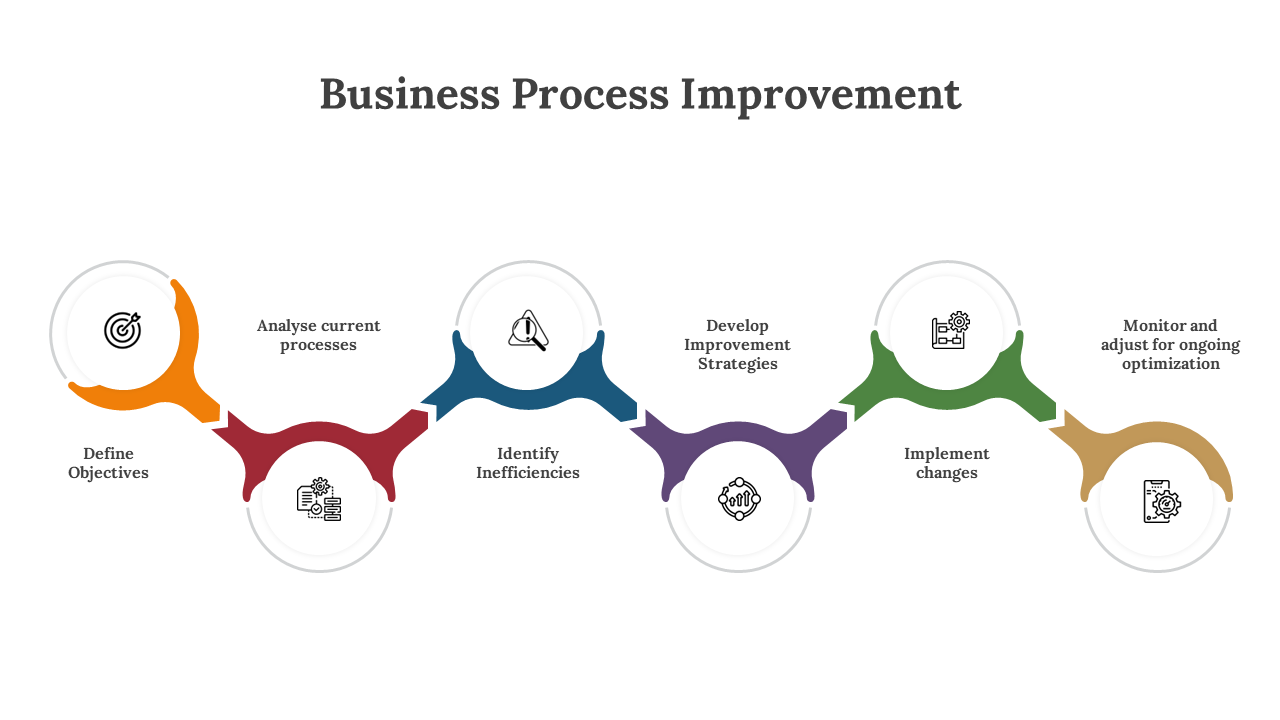
In the dynamic world of business, Business Process Improvement isn't merely a buzzword; it's a vital concept, symbolizing the relentless pursuit of operational excellence. This practice involves the systematic enhancement of workflows, the eradication of inefficiencies, and the promotion of a lean and agile business model. Business Process Improvement is about identifying bottlenecks, reducing errors, and delivering superior results to customers and stakeholders. It's a pathway to staying ahead of the curve in an ever-evolving marketplace. This concept is the lynchpin of modern organizations, fostering adaptability and competitiveness. Now, transitioning to the advantages and uses of our Business Process Improvement PowerPoint template: anyone, from seasoned executives to small business owners and project managers, can benefit from it. This template serves as a structured platform to effectively communicate process improvement strategies, allowing for complete customization to meet specific needs. It's a meticulously designed, user-friendly tool featuring a variety of pre-designed slides and layouts, all unified by a modern and professional design. With fully editable slides, it simplifies the presentation creation process, ultimately saving you time. By utilizing this template, you empower yourself to drive transformative change and operational efficiency within your organization. Encourage your audience to embrace this template and harness its potential to lead the way in the fast-paced business environment of today.
Features of the templates:
- 100% customizable slides and easy to download.
- Slides are available in different nodes & colors.
- The slide contained 16:9 and 4:3 formats.
- Easy to change the slide colors quickly.
- It is a well-crafted template with an instant download facility.









You May Also Like These PowerPoint Templates


Showing20 of69,218 templates