
Have you ever felt scared when talking in front of people? Many of us worry about speaking to groups. But here’s some good news – good slides can truly help you become a better speaker. Let’s find out how simple, clean slides can boost your speaking skills and make your talks better.
Why Your Slides Matter for Your Speaking
When you stand up to talk, your slides are like a helpful friend. They work with you, not against you. Good presentation slides support your words and help you stay on track.
Think about the last time you saw someone give a talk with messy, crowded slides. The speaker probably seemed unsure, and you might have felt confused too. Now think about a talk with clear, simple slides. The speaker likely seemed more sure of themselves, and you understood the message better.
This is not just by chance. Well-designed PowerPoint slides actually help speakers in many ways.
How Good Slides Make You a Better Speaker
1. They Give You Something to Follow
Good slides work like a map for your talk. When your presentation design is clear, you can glance at your slide and know exactly what to say next. This helps you:
- Stay on topic
- Remember all your key points
- Move smoothly from one idea to the next

Maria, a college teacher, says: “Before I fixed my slides, I would often lose my place during talks. Now my slides have clear headings and simple points, and I never get lost. My speaking confidence has grown so much!”
2. They Help You Practice Better
When you have good slides, practicing your talk becomes easier. You can:
- Go through your slides one by one
- Learn which slide comes next
- Time how long each part takes
- Feel ready for the real talk

Good slide layouts help you know exactly what you’ll say for each slide. This makes your practice time much more helpful.
3. They Take Away Some Pressure
Speaking to groups can feel scary. Good slides help take some of that fear away. When people look at your slides, they aren’t staring only at you. Also, knowing you have clear slides to help you means less worry about forgetting what to say.
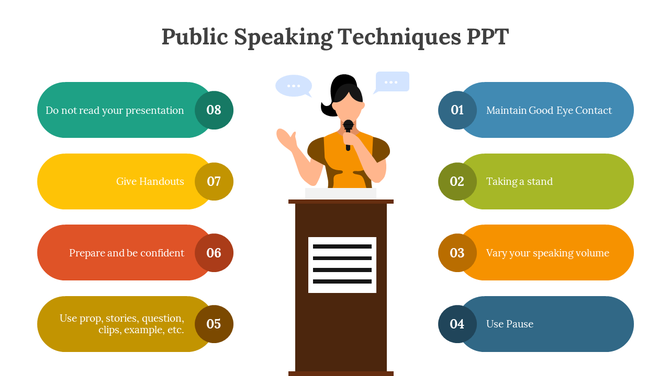
Research shows that public speaking anxiety goes down when speakers have well-made slides to support them. The slides work as a backup – you know the main ideas are there if you need them.
4. They Make People Listen Better
When your audience engagement is high, you naturally speak better. Good slides help keep people interested and focused on what you’re saying.
Think about it: when people understand your slides, they understand your words better too. They nod and show they get it. This positive feedback makes you feel good and speak with more energy.
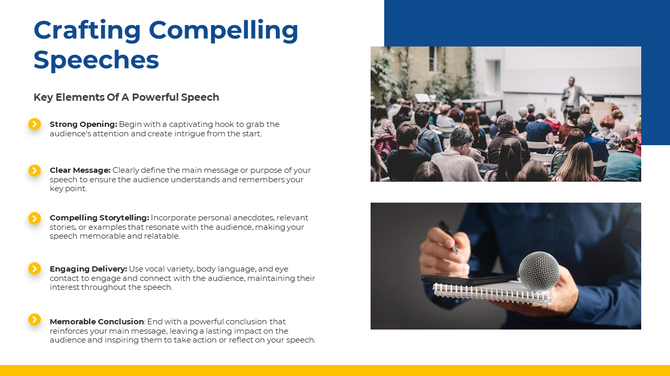
Juan, who works in sales, noticed: “With my old, text-heavy slides, people would look confused. Now that I use simple designs with pictures, people smile and nod along. This makes me feel great and speak with more passion.”
What Makes Slides “Good” for Speaking?
Not all slides help you speak better. Some actually make it harder! Here’s what makes slides good for speakers:
Keep It Simple
Simple slide designs are best. When your slides have too much stuff, you might:
- Feel like you need to read everything on the slide
- Get confused about what to say next
- Speak in a boring way as you read text
Instead, use:
- Short phrases, not full sentences
- Just 1-3 main points per slide
- Plenty of empty space
This simplicity lets you add your own words naturally, which makes your speaking sound better.
Use Pictures That Help Tell Your Story
Presentation visuals like photos, simple charts, or icons can:
- Help explain hard ideas
- Give you something to talk about
- Help people remember your message
Ravi, an IT trainer, says: “Adding the right pictures to my slides changed everything. Now I can point to an image and explain complex ideas in a simple way. My speaking skills have improved because I’m more relaxed.”
Make Sure Your Slides Are Easy to Read
If you can’t read your own slides easily, you’ll stumble when speaking. Good slides have:
- Big enough text (at least 24-point font)
- Colors that stand out from the background
- Clean, simple fonts
When you can quickly read and understand your own slides, your speaking flows better.
How to Practice With Your Slides
Having good slides is just the start. You also need to practice with them the right way. Here’s how to use your slides to become a better speaker:
1. Don’t Memorize Word for Word
Your slides should have key points, not everything you’ll say. Practice speaking naturally about each slide rather than memorizing exact words. This makes your talk sound more real and interesting.
2. Know Your Slides Well
Be very familiar with which slide comes next. Practice until you know the order without thinking about it. This helps your presentation flow and stops awkward pauses.
3. Practice Transitions Between Slides
The way you move from one slide to the next is important. Plan what you’ll say as you change slides. Good verbal transitions in your talk make everything feel smooth.
4. Time Yourself
Know how long to spend on each slide. Some slides might need more time than others. When you practice with a timer, you’ll learn how to pace your talk just right.
When Good Slides Matter Most
Good slides help in all speaking situations, but they’re especially important when:
You’re Speaking About Complex Topics
When your topic is hard to understand, good slides can:
- Break down complex ideas into simple steps
- Show relationships with simple diagrams
- Give real-world examples through pictures
This helps both you and your listeners make sense of difficult ideas.
You’re Nervous About Speaking
If you get very nervous about public speaking, well-designed slides can be a real comfort. They give structure to your talk and help you through scary moments. For more tips on building confidence and improving your delivery, check out The Ultimate Guide to Becoming a Great Speaker.
You’re Speaking in a Language That’s Not Your First
Many people speak in languages they’re still learning. Good slides with clear visuals help bridge any language gaps and make your speaking clearer.
You’re Speaking for a Long Time
For longer talks, good slides help you stay organized and keep your energy up. They also help your audience stay focused through the whole presentation.
Conclusion: Better Slides, Better Speaking
The connection between good slides and good speaking is clear. When your slides are simple, clear, and well-designed, your speaking naturally improves. You feel more confident, stay on track better, and connect more with your listeners.
Remember:
- Simple, clean slides free you to speak naturally
- Clear visuals help explain your ideas better
- Well-organized slides keep both you and your audience focused
- Less text means less reading and more real talking
Next time you prepare for a talk, spend time making your slides work for you or try using ready-made PowerPoint templates. Your speaking will get better, your message will be clearer, and your audience will thank you. So, do good slides help you speak better? Yes – absolutely!
🙋♀️ Frequently Asked Questions (FAQs)
1. Can slides really make someone a better speaker?
Yes, good slides guide your talk and make you feel more confident.
2. What should I avoid in my presentation slides?
Avoid too much text, small fonts, and messy layouts.
3. How many points should I include on each slide?
Use only 1 to 3 main points per slide to keep it simple.
4. Are pictures better than words in slides?
Yes, pictures explain ideas faster and are easier to remember.
5. Should I memorize my talk or use slides as a guide?
Use your slides as a guide and speak in your own words.